You add a rule to a Vue application. It could go in the component’s <script setup>, a composable, or a Pinia action. All three can work. The harder decision is which dependencies that rule should have.
A discount calculation should produce the same result whether a user clicks a button or an import script creates an order. A Snake collision should follow the same rules whether the player uses a keyboard or on-screen controls.
Hexagonal architecture gives application rules their own boundary. Vue handles the interface. The application exposes operations that Vue can call, and it describes the external capabilities it needs through contracts called ports.
For me, the most immediate benefit is testing business logic without setting up the UI. You can pass data into a pure rule or call an application operation in Vitest, check the result, and cover edge cases without clicking through the application. Browser tests can then focus on whether the interface connects those rules to the user correctly.
For a Vue developer, the useful part is knowing where to put each responsibility. We’ll use my Hex Snake project to work through those choices, follow a user action across the boundary, and see what becomes easier to change and test.
This post belongs to my Vue Architecture Guide. In the Nuxt Layers article, we separated features and enforced their dependencies. Here, we’ll separate application behavior from the framework. You can apply this boundary inside an existing feature or Nuxt layer.
Imagine a useSnakeGame() composable that handles keyboard events, moves the snake, detects collisions, and updates a reactive score. Extracting it from App.vue makes the component smaller. The gameplay still depends on Vue and browser scheduling.
To test one collision, you may need to mount a component, advance a fake timer, and control random food placement. To add another input method, you need to check whether the keyboard handler contains rules that the new controls must also obey.
The responsibilities change for different reasons:
- Presentation changes: rename a button, move the score, or show a pause overlay.
- Application changes: reject a move, award a point, or decide that the game is over.
- Technology changes: read keyboard events, schedule a timer, or obtain a random value.
Hexagonal architecture gives you a place for each responsibility and a rule for their dependencies. You can keep Vue’s components and composables while moving application rules behind an API.
Alistair Cockburn described hexagonal architecture, also called ports and adapters, as a way to run an application through different drivers and isolate it from external technologies.
For Hex Snake, the inside owns movement, collisions, scoring, and the game lifecycle. The outside translates keyboard events, schedules ticks, supplies randomness, and renders snapshots.
A port describes a conversation across that boundary. An adapter connects a particular technology or driver to it.
| Concept | Hex Snake example |
|---|---|
| Application core | The game rules and state transitions |
| Driving port | SnakeGame, with commands such as turn() and tick() |
| Driving adapters | Vue/browser integration, tests, and the headless script |
| Driven port | RandomSource, which supplies a bounded integer |
| Driven adapters | Browser randomness and fixed or seeded test implementations |
The distinction between driving and driven comes from who initiates the interaction. A test calls the game. The game calls a random source when it needs a food position.
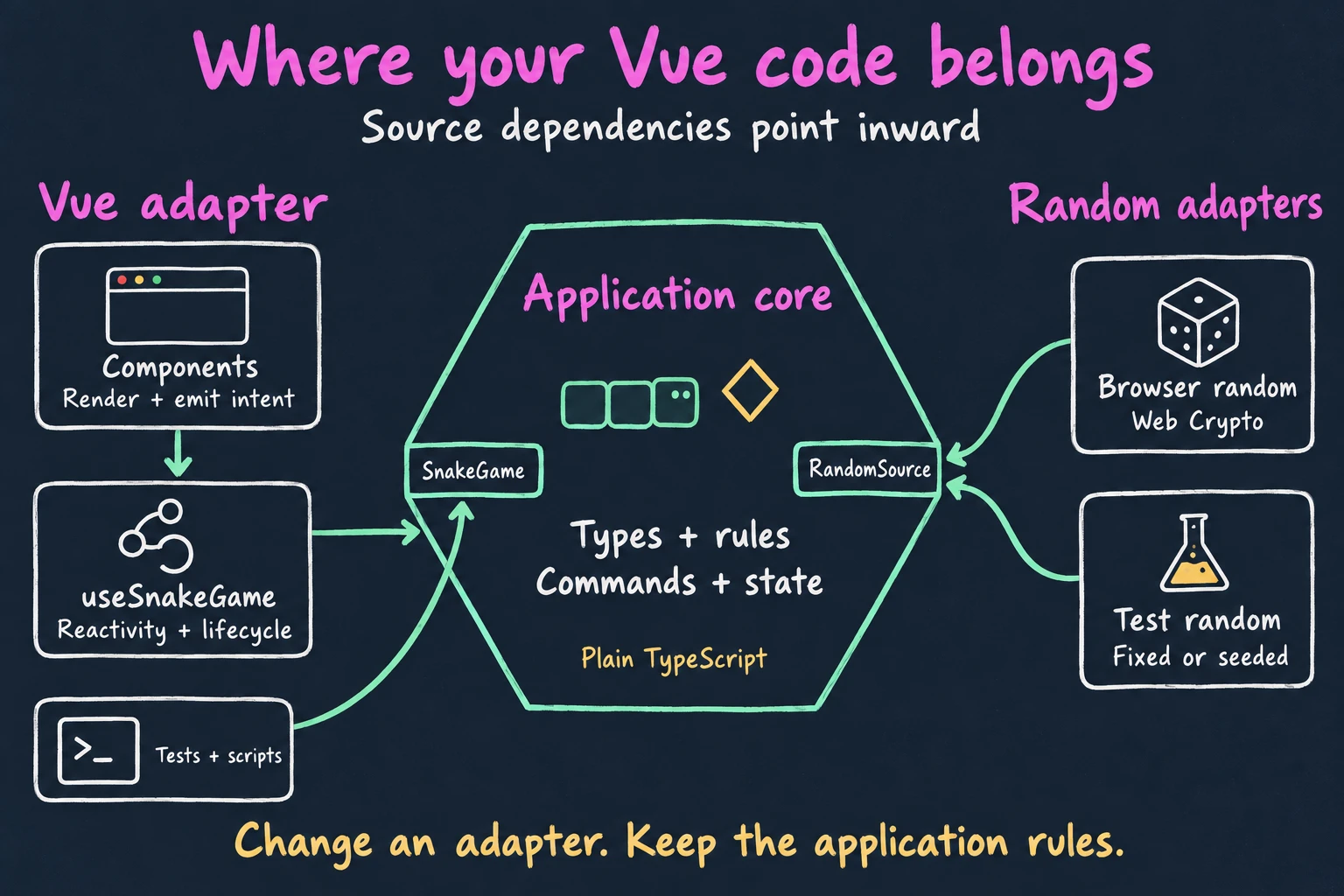
These arrows show source dependencies, including type imports. The core defines RandomSource, and the browser adapter implements that contract. The core never imports the browser adapter. At runtime, the core can call the supplied adapter through that interface.
Use this question when placing code: would this rule still apply if a script called the application instead of a Vue component? If yes, it is a candidate for the application core. If it concerns rendering or a particular device, put it at the edge.
| Responsibility | Put it in | Snake example | Advantage |
|---|---|---|---|
| Render data and collect user intent | A Vue component | Draw the board; emit a direction from a button | Change the layout without editing movement rules |
| Connect the application to Vue’s lifecycle and reactivity | A composable | Subscribe into a shallowRef; clean up on unmount | Keep components small and subscriptions scoped to their lifetime |
| Represent application state and concepts | Core types | Direction, GameStatus, GameSnapshot | Use the same vocabulary in the UI, tests, and scripts |
| Decide what is allowed | Core rules | Reject a reversal; detect a collision | Apply the same rule to every input method |
| Coordinate an application operation | Core application code | tick() moves, checks collisions, and updates the score | Test the complete operation through one API |
| Describe a conversation across the boundary | A core-owned port | SnakeGame and RandomSource | Let callers and implementations agree on a contract |
| Translate a technology into that contract | An adapter | Keyboard events, browser timer, Web Crypto | Replace one integration without rewriting the rules |
| Choose concrete implementations | The composition root | main.ts supplies browserRandom | See which dependencies production uses in one place |
A component can format a score, show a result overlay, or keep a help panel open. Those are UI responsibilities. It can also emit an intent such as “move up.”
In GameControls.vue, the button emits a direction. This shortened example preserves that division:
<script setup lang="ts">
import type { Direction } from '../game/model'

const emit = defineEmits<{ turn: [direction: Direction] }>()
</script>

<template>
  <button type="button" @click="emit('turn', 'up')">Move up</button>
</template>
The component does not decide whether “up” is legal. The core checks that rule so the keyboard adapter and a test get the same answer. A disabled button can help the player, but it should not be the only place that protects an application rule.
useSnakeGame() connects snapshots to Vue reactivity, forwards user actions, and owns listener cleanup. It also derives the primary button label from the game status.
Composables are part of the Vue adapter in this design. The folder name does not introduce another architectural layer.
The core contains both small rule functions and the operations that coordinate them. In Hex Snake, rules.ts answers questions such as whether a position lies inside the board. createSnakeGame.ts owns the game state and exposes operations such as turn() and tick().
For a larger feature, you could split core code into domain/ for rules and application/ for operations. This example keeps both in game/. Extra folders are useful only when they help you navigate the code.
The keyboard adapter translates ArrowUp into the application’s up direction. The timer calls tick() at an interval. The random adapter supplies an integer through RandomSource.
An adapter may contain substantial technical logic: removing event listeners or sampling random integers without bias. Keep application policy out of it. The random adapter supplies a number; the core decides which cells can contain food.
Put a port around a capability the application needs; you do not need an interface for each helper function.
These are the actual files in Hex Snake. Their responsibilities matter more than their names:
In a feature-based application, you can place this whole structure under src/features/snake/. Other features can keep their current organization. You do not need an application-wide rewrite to introduce one boundary.
A driving port exposes application operations to callers. A driven port describes a capability the application needs from outside. Both belong to the core because they use the application’s vocabulary.
The two interfaces in src/game/ports.ts describe what a driver can ask the game to do and what the game needs from randomness:
import type { Direction, GameSnapshot } from './model'

export interface RandomSource {
  nextInt(maxExclusive: number): number
}

export interface SnakeGame {
  start(): void
  turn(direction: Direction): void
  tick(): void
  pause(): void
  resume(): void
  getSnapshot(): GameSnapshot
  subscribe(listener: (snapshot: GameSnapshot) => void): () => void
}
turn() queues a legal direction. tick() advances the application by one move. The browser decides how often to call tick(). A test decides which call happens next.
GameSnapshot describes the result: status, snake positions, direction, pending turn, food, score, and board dimensions. The core clones and freezes snapshots so callers cannot mutate the game through a returned object. Vue receives state it can render and sends commands when the player acts.
The core creates a list of free cells, asks for an index, and validates the adapter’s answer:
function pickCell(cells: readonly Position[], random: RandomSource): Position {
  const index = random.nextInt(cells.length)
  if (!Number.isInteger(index) || index < 0 || index >= cells.length) {
    throw new RangeError(`RandomSource returned ${index} for range 0..${cells.length - 1}`)
  }
  return clonePosition(cells[index]!)
}
The production adapter uses browser Web Crypto. Tests can return a fixed index or use a seeded generator. None of those implementations needs to know the scoring rules.
The core also handles a full board before asking for randomness. Eating the last free cell changes the status to won; requesting an index from an empty list would violate the port’s contract.
There is no database in this example because Snake has no persistence requirement. Randomness gives us a useful driven port without adding an unrelated feature.
The production entry point selects the dependencies:
// src/main.ts
import { createApp } from 'vue'
import App from './App.vue'
import { browserRandom } from './adapters/browserRandom'
import { createSnakeGame } from './game/createSnakeGame'
import './style.css'

createApp(App, {
  createGame: () => createSnakeGame({ width: 12, height: 12 }, browserRandom),
}).mount('#app')
This is the composition root: the place where we choose concrete implementations and connect them. App passes the factory to useSnakeGame. Restart uses the factory again to create a fresh application instance.
Inside the composable, Vue holds the latest snapshot in a shallowRef. The subscription replaces it when the game changes. This excerpt shows the connection:
const snapshot = shallowRef<GameSnapshot>()
const ticker = createBrowserTicker(145)
let game: SnakeGame
let unsubscribe = () => {}

function connect(nextGame: SnakeGame) {
  unsubscribe()
  game = nextGame
  unsubscribe = game.subscribe((value) => {
    snapshot.value = value
    if (value.status === 'running') ticker.start(() => game.tick())
    else ticker.stop()
  })
}
shallowRef fits because the application replaces immutable snapshots. Vue has no nested game state to edit.
The composable registers keyboard listeners and pauses the game when the tab becomes hidden. On unmount, it unsubscribes from the game, removes the browser listeners, and stops the timer. These resources share the lifetime of the mounted UI.
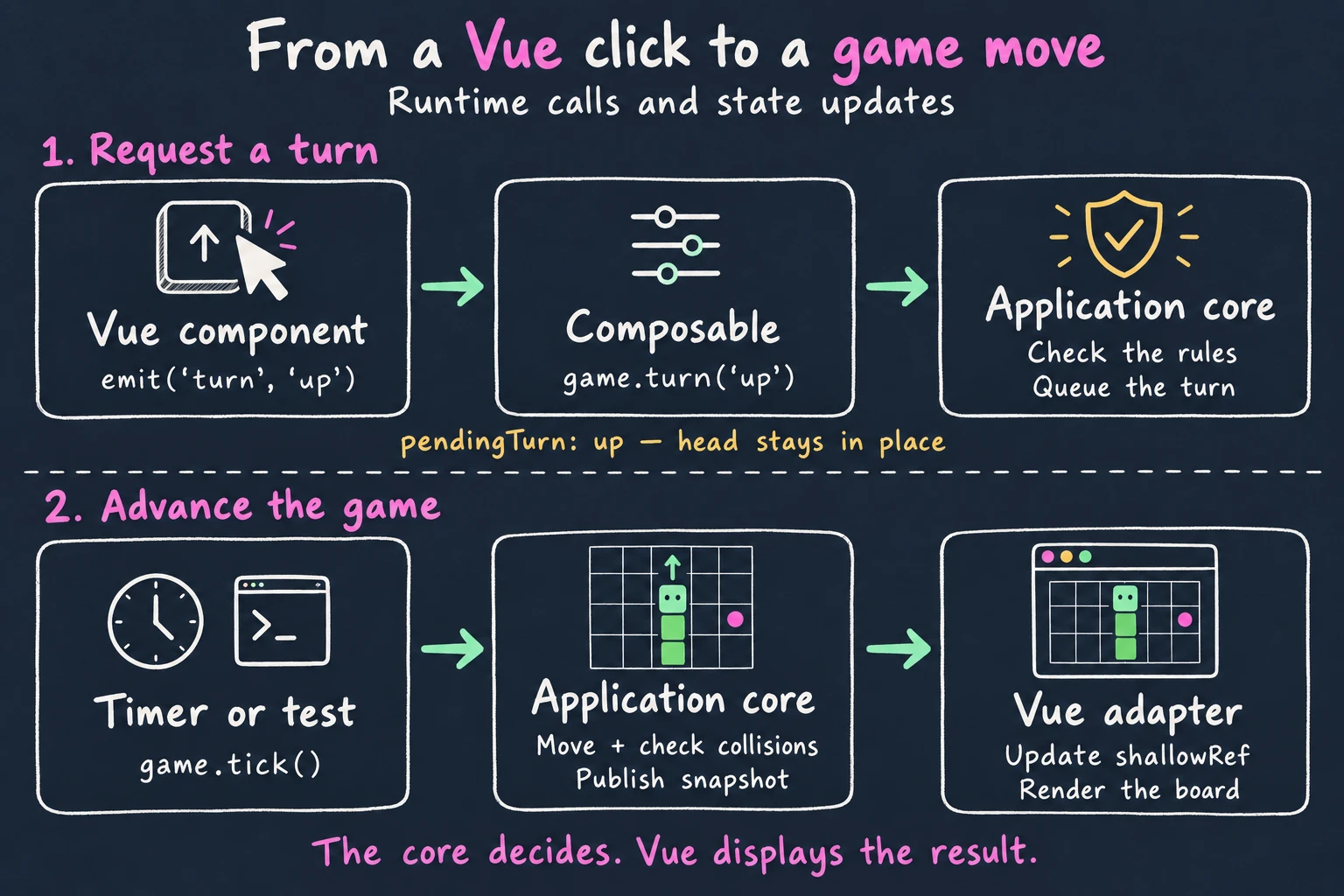
The full path for an on-screen turn is:
GameControls.vueemitsturnwith the directionup.App.vueforwards the event touseSnakeGame().turn().- The composable calls
game.turn('up')and focuses the board. - The core checks the current status, pending input, and reversal rule. It queues an accepted turn and notifies subscribers.
- The composable replaces its snapshot ref. Vue renders the updated state.
The head moves on the next tick(). In the production app, the browser timer triggers that call. In a test, you call it yourself.
This playground uses a copy of the project’s unchanged core with a different Vue adapter. Press Step once: the snake eats the food at (3, 2), and the score becomes 1.
Next, choose up. The head stays in place while pendingTurn changes. Press Step again to consume that turn. Reset restores the same starting conditions. Play uses a timer to call the same tick() method.
Take the next step
Step through commands or let a timer drive the same game. Food always uses the first free cell.
● Head · ◆ Food · Coordinates start at (0, 0).
Use the direction buttons or arrow keys while a control has focus.
{
  "status": "ready",
  "head": {
    "x": 2,
    "y": 2
  },
  "direction": "right",
  "pendingTurn": null,
  "food": {
    "x": 3,
    "y": 2
  },
  "score": 0
}
A turn queues a direction. The next tick moves the snake. An immediate reversal is ignored.
Ready. Press Step once to eat the first food.
Try left immediately after Reset. The snake starts facing right, so the core rejects the reversal. The adapter can request a move; the application decides whether it is legal.
The fixed random adapter returns 0, choosing the first free cell whenever the snake eats. Repeat the same commands after Reset and you get the same snapshots.
Hex Snake keeps game state in the core so a Vue component and a headless script can drive the same stateful application. The composable holds its latest snapshot. This example needs no Pinia store.
If several components needed access, I would use a Pinia store to expose that snapshot and forward commands. I would keep the snake and score writable through the core’s operations, avoiding a second copy that components could edit independently. Shared UI state, such as the selected panel, could still belong to Pinia.
That is a design choice for this application. In QWAN’s Vue example, state objects sit at the domain boundary and delegate to plain JavaScript domain objects. Juan Otálora’s React example places Redux in infrastructure. Neither gives you a universal folder location for a store.
Choose who owns the state and how callers may change it. Then keep the rules you want to run independently free of framework dependencies. Hex Snake’s snapshot subscription is one way to do that.
Most Vue projects deal with forms and API requests. Consider a hypothetical order feature: the customer selects products, submits an order, and sees either confirmation or an error. These filenames illustrate the same responsibilities; they are not extra modules in Hex Snake.
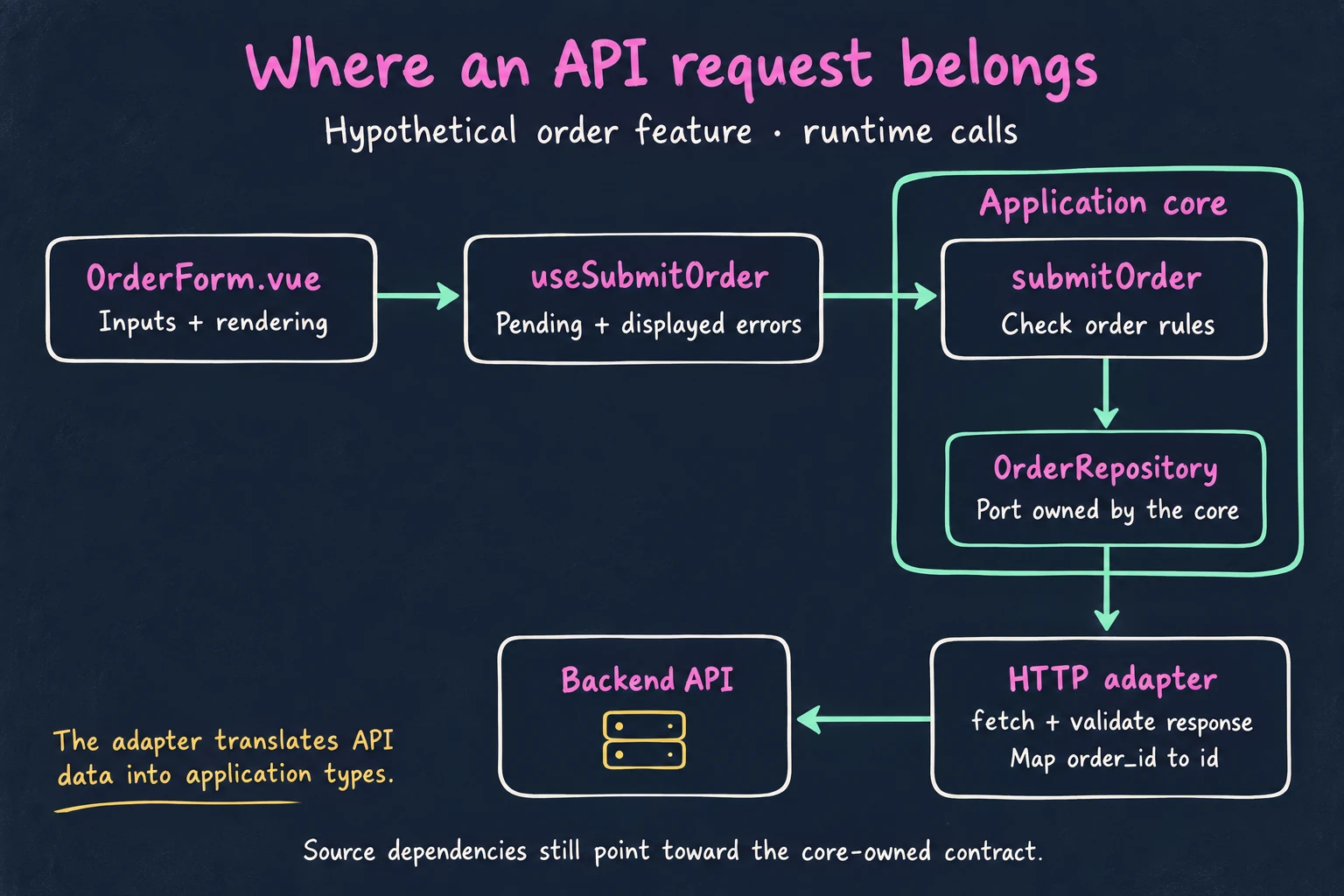
| Question | Example location | Responsibility |
|---|---|---|
| Where do input fields and inline messages go? | components/OrderForm.vue | Collect input, render feedback, and emit the submit intent |
| Where do pending state and error presentation go? | composables/useSubmitOrder.ts | Call the operation, track the in-flight request, and expose feedback to Vue |
| Where do order rules go? | core/orderRules.ts | Check meaningful constraints, such as requiring at least one item with a positive quantity |
| Where does the submission workflow go? | core/submitOrder.ts | Check the rules, request persistence through a port, and return an outcome |
| Where is the persistence contract? | core/ports.ts | Describe what OrderRepository must accept and return in application terms |
Where do fetch() and API response types go? | adapters/httpOrderRepository.ts | Send the request, validate the response shape, and map transport fields to the application’s model |
| Where do we choose HTTP or an in-memory implementation? | The feature’s setup or application entry point | Supply the concrete repository to the operation |
The composable can set isSubmitting before awaiting the operation and clear it in finally. The core returns a meaningful outcome; the UI decides whether to display a field message, a toast, or a confirmation panel. An HTTP adapter translates transport failures into the outcomes the application contract supports.
For validation, distinguish interaction feedback from order rules. Showing a message after a field loses focus belongs to the UI. Rejecting an order with no items belongs to the application operation, so another caller cannot skip the check. The backend must still enforce authoritative order rules: browser-side validation helps the user but cannot establish trust.
Suppose the API renames order_id to id. The response mapping changes in the HTTP adapter; the UI can keep receiving an Order with the same shape. To test rejection of an empty order, supply an in-memory repository and call the operation without mounting the form.
This is the same separation as RandomSource: the core describes what it needs, while an adapter deals with the technology. You gain a place to contain API-specific details, at the cost of writing the contract and mapping code.
When a rule lives inside a component event handler, testing it can require rendering the component, filling inputs, and triggering the right event. After extracting it, you can arrange the relevant data and call it. That makes unusual states easier to reproduce and failures easier to trace to a rule.
Pure functions need only inputs and expected outputs. Stateful application operations need an initial state and controlled dependencies. Neither needs a Vue component. The boundary lets you cover rule combinations here and use browser tests to check the connections around them.
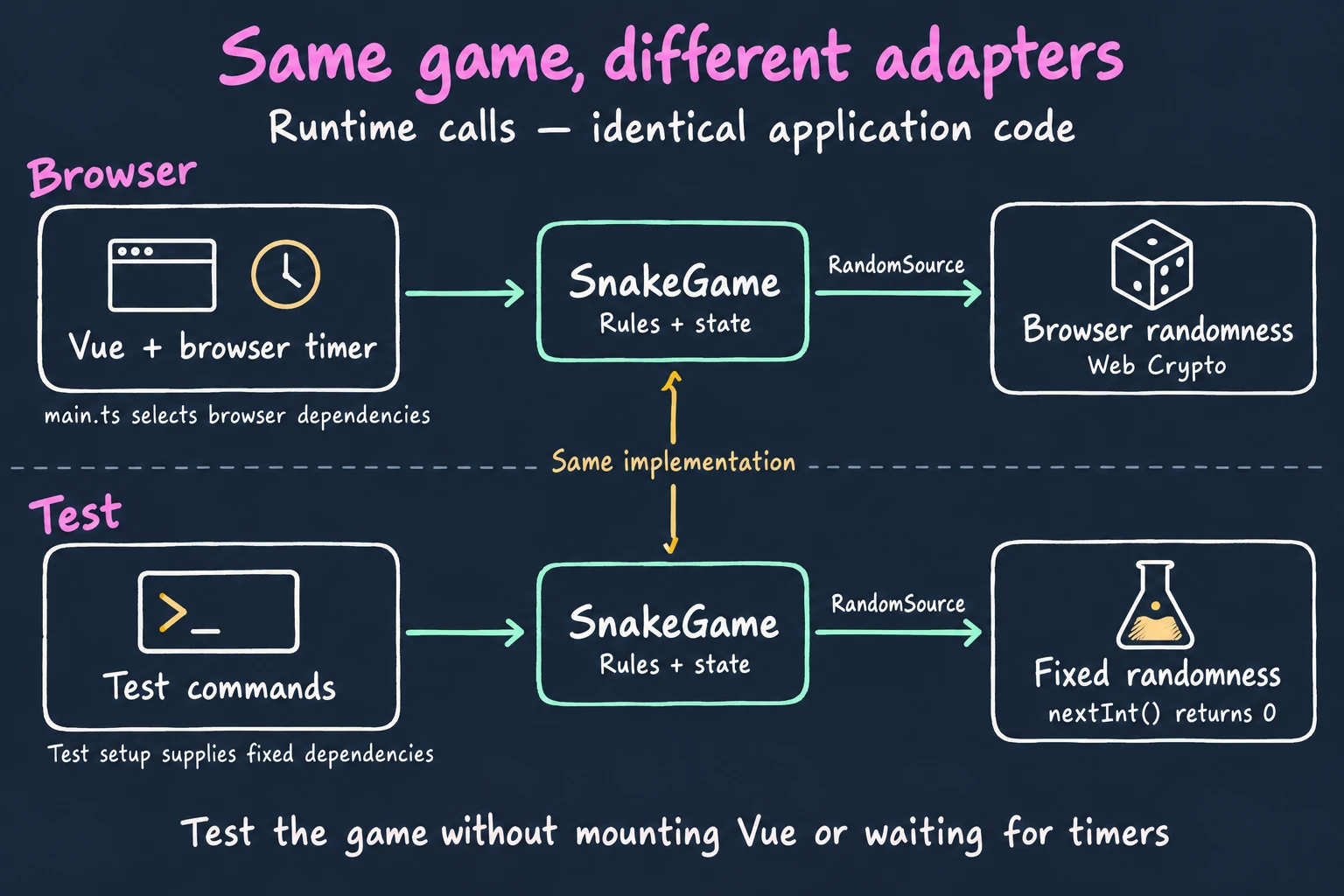
This test comes from createSnakeGame.test.ts. It supplies the initial positions and a fixed random source:
import { expect, it } from 'vitest'
import { createSnakeGame } from './createSnakeGame'
import type { RandomSource } from './ports'

const first: RandomSource = { nextInt: () => 0 }

it('moves, eats, scores, and picks food through the injected random source', () => {
  const game = createSnakeGame({
    width: 5,
    height: 5,
    initialSnake: [{ x: 2, y: 2 }, { x: 1, y: 2 }],
    initialFood: { x: 3, y: 2 },
  }, first)

  game.start()
  game.tick()

  expect(game.getSnapshot()).toMatchObject({
    status: 'running',
    score: 1,
    snake: [{ x: 3, y: 2 }, { x: 2, y: 2 }, { x: 1, y: 2 }],
    food: { x: 0, y: 0 },
  })
})
The test runs in Node. It calls application commands and checks the resulting snapshot. There is no component mount or elapsed time to manage.
The departing-tail rule deserves a separate test. During a normal move, the tail leaves its cell as the head advances. During an eating move, the snake grows and keeps the tail. The core expresses that distinction before checking collisions:
// Excerpt from tick() in createSnakeGame.ts.
const eating = snapshot.food !== null && samePosition(head, snapshot.food)
const bodyToCheck = eating ? snapshot.snake : snapshot.snake.slice(0, -1)
Reaching that bent-snake arrangement through clicks and key presses would make this rule test tedious. At the application boundary, a test supplies it through initialSnake, calls tick(), and asserts that the game remains running. You can run such a test in Node or a browser. The useful distinction is calling the application API versus exercising the UI.
The project’s headless script uses that same API. It plays a short game twice with the same seed, checks that both runs reach a loss with score 1, and compares the final snapshots:
pnpm demoThe driver lives in scripts/headless-demo.ts.
Choose the test’s scope first, then the environment it needs. This is how I would divide coverage for a Vue feature:
| What are you checking? | Default tool | Example assertion |
|---|---|---|
| Pure business rules | Vitest in Node | Moving up decreases the head’s y-coordinate; an empty order is invalid |
| Application operations with controlled dependencies | Vitest in Node | Eating increases the score and asks the supplied random source for a new food position |
| Adapter translation | Vitest in Node when its dependencies support it; Browser Mode for browser-specific behavior | An HTTP response maps order_id to id; a malformed response produces the expected failure |
| Vue components, lifecycle integration, and browser interactions | Vitest Browser Mode with vitest-browser-vue | Clicking a control updates the rendered board; unmounting stops the integration from responding to keyboard input |
| Journeys through the running application | Playwright Test | Load the game, start, steer, pause, and restart using the visible controls |
Vitest in Node: cover the rules and operations. Node is Vitest’s default environment. For a pure rule from rules.ts, a focused test could look like this:
import { expect, it } from 'vitest'
import { nextHead } from './rules'

it('moves up by one cell', () => {
  expect(nextHead({ x: 2, y: 2 }, 'up')).toEqual({ x: 2, y: 1 })
})
The earlier createSnakeGame test covers a larger operation through its public API. It uses the real rules and supplies a fixed RandomSource. For the order feature, supply an in-memory OrderRepository and check that an invalid order never reaches persistence. Avoid mocking the rules you are trying to verify. Add focused pure-function tests where they explain meaningful edge cases; you do not need a separate test for every private helper.
Vitest Browser Mode: check Vue and browser integration. Browser Mode runs tests in a real browser. Render a component or a small feature with vitest-browser-vue, interact through accessible controls, and assert the rendered outcome. Keep the real application core when practical and substitute only dependencies that need control. For this article’s playground, clicking Step should update the visible score and board. That checks the component-to-core connection; the Node tests can cover the collision combinations.
Test concrete adapters separately too. An in-memory repository proves that an operation works with that contract; it does not prove that the HTTP implementation sends the right request or validates its response. Exercise the HTTP adapter against controlled responses. Use a real browser when browser behavior, such as focus, storage, or event handling, is what you need to verify.
Playwright Test: check the assembled application. Open the application URL and exercise a few important journeys with its entry point, routing, and production wiring in place. Check outcomes the user can observe, following Playwright’s testing guidance. A passing core test cannot tell you whether the Start button connects to the game. A passing component test cannot tell you whether the application entry point supplies the right dependencies. Be explicit when a journey substitutes a backend or adapter: it verifies the connections you actually run.
The downloadable Hex Snake project uses pnpm test for its Node-based Vitest suite and pnpm test:e2e for Playwright journeys. It does not configure Vitest Browser Mode. The embedded playground in this blog has separate Browser Mode tests. The table describes where I would place each kind of check as a Vue project grows.
You can also run pure rules in Browser Mode if that suits your suite. Node is a convenient default for this framework-independent code. The architectural benefit is that testing a business rule no longer requires interacting with the UI, whichever runner you choose.
The benefit becomes concrete when you consider the next change:
| Change request | Main place to change | Behavior you can reuse |
|---|---|---|
| Display the score in a different layout | Vue components | Scoring and game lifecycle |
| Add touch controls | Input adapter and Vue wiring | Direction validation and movement |
| Reproduce a sequence of moves | A test or script with a fixed/seeded adapter | The same application commands |
| Allow the snake to wrap around the board | Core movement/collision rules and their tests | Existing UI and input wiring, if the API stays the same |
The core tests protect movement and scoring while browser tests check that the controls still connect to them.
Imagine adding a difficulty selector where Hard mode moves faster and awards two points per food. This is a proposed extension, not a feature in the download.
- Component: add the selector and emit the choice.
- Configuration and wiring: define the available modes and pass the selected scoring and timing settings to the game and its Vue integration.
- Core: accept the points-per-food setting and apply it when eating. Test that Hard mode awards two points.
- Timer integration: accept the selected interval instead of using a fixed
145ms. The browser adapter still owns scheduling the callbacks.
The speed setting describes the game’s pacing policy; the timer adapter implements the scheduling mechanism. Moving that policy into an adapter because it involves time would blur the distinction.
This feature touches several files. The boundary makes each edit’s responsibility explicit; it does not make the feature a one-file change. QWAN describes a similar cost when adding a field requires updates to the UI, domain, and API mapping.
For a small feature, the wiring and mapping code may cost more than they save. Use the boundary where it reduces testing or change-management friction.
The core defines its model and ports. Vue code and technology adapters can import those definitions. The core should not import useSnakeGame, GameBoard.vue, or the concrete browser random adapter.
For example, GameControls.vue imports the core’s Direction type. That is an inward dependency. Importing Vue’s ref into the game to hold its state would tie the application back to the framework we intended to keep outside.
The core can still call an adapter at runtime. It receives that adapter through a port such as RandomSource, so its source code depends on the contract it owns. main.ts chooses the implementation. This is dependency inversion in this example.
Hex Snake protects this policy with a local Oxlint rule and a separate TypeScript configuration:
pnpm check:boundariesThe lint rule rejects external imports and environment capabilities in production core files. TypeScript compiles those files without browser or Node globals. The full configuration and rule live in the downloadable project.
Start with a rule you find difficult to test in its current component, composable, or store. Pricing, scheduling, editor operations, and game behavior are good candidates because they have meaningful outcomes independent of rendering.
- Extract the rule into plain TypeScript. Pass the data it needs and return a result. Keep presentation concerns in Vue.
- Give the operation a callable API. Let a test request an action and inspect its outcome. Group state and related operations when they need a shared lifecycle.
- Identify external capabilities. For randomness, persistence, or networking that the operation needs, define a small contract in the core and supply an implementation from outside.
- Connect Vue. Use a composable or an existing store to expose snapshots, forward commands, and clean up subscriptions. Choose production implementations at the entry point.
A form that mostly displays server data may gain little from this structure. A feature with rules that keep leaking across components has more to gain. Keep the boundary small enough that you can explain what each part owns.
For an exercise, add a second way to turn the snake. Keep the input translation in an adapter and call the existing turn() operation. Then change a movement rule in the core and check it through a test. Those two changes let you practice placing interface behavior and application behavior on their respective sides of the boundary.
- How to keep Front End complexity in check with Hexagonal Architecture, by Marc Evers and Rob Westgeest: a Vue experience report on responsibility placement, API mapping, and trade-offs.
- Hexagonal Architecture in Frontend: a shopping-cart example with Vue, React, and React Native interfaces sharing domain code.
- Clean Architecture on Frontend, by Alex Bespoyasov: a related approach covering application use cases, ports, and adapters in a React/TypeScript shop. Clean Architecture and hexagonal architecture share ideas, but this article does not require adopting its full layer structure.