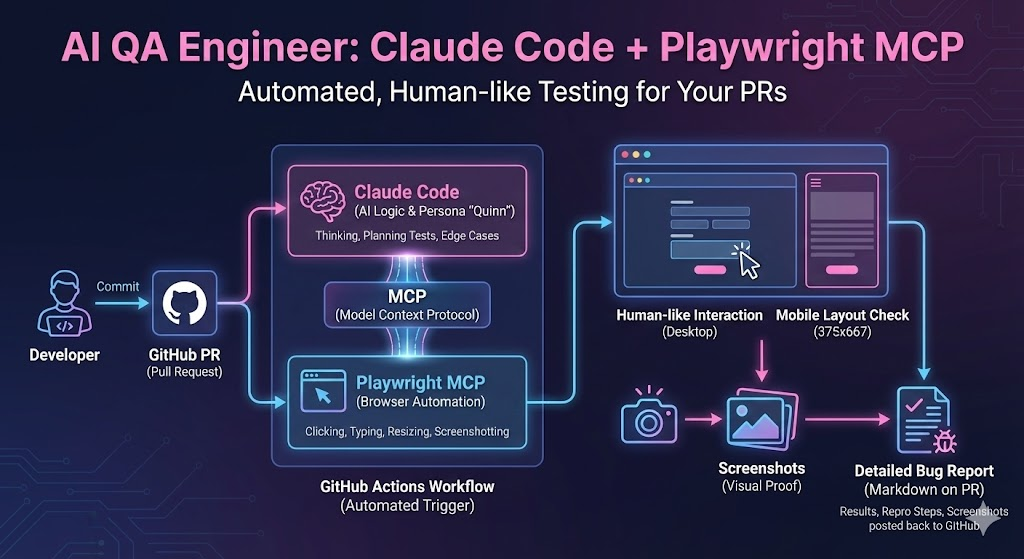
- Build an AI-powered QA engineer that tests your app through the browser like a real user
- Use Claude Code with Playwright MCP to automate browser interactions
- Run automated QA on every pull request via GitHub Actions
- Get detailed bug reports with screenshots posted directly to your PRs
Open Table of Contents
- Introduction
- The secret sauce: Claude Code + Playwright
- Step 1: Give Claude a personality
- Step 2: Create the GitHub Action
- Step 3: Tell Claude what to test
- What Quinn actually does
- The report
- The toolbox
- Why this works
- Comparison: AI QA vs traditional testing
- Getting started
- A word of caution
- Conclusion
- Additional resources
Manual testing gets old fast. Clicking through your app after every change, checking if forms still work, making sure nothing breaks on mobile—it’s tedious work that most developers avoid.
So I built an AI that does it for me.
Meet Quinn, my automated QA engineer. Quinn tests my app like a real person would. It clicks buttons. It fills forms with weird inputs. It resizes the browser to check mobile layouts. And it writes detailed bug reports.
The best part? Quinn runs automatically every time I open a pull request.
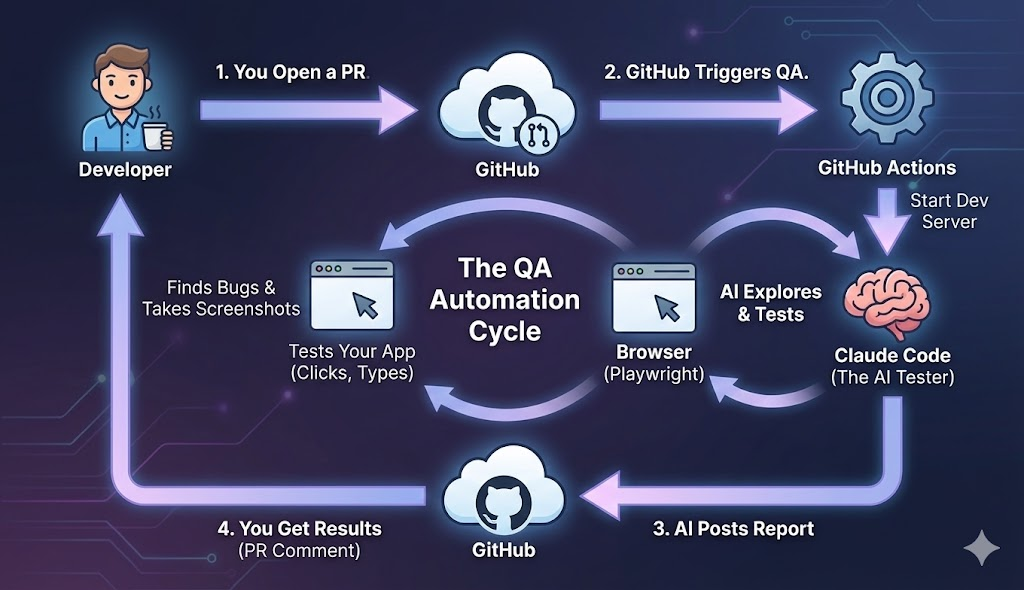
Two tools make this possible:
Claude Code is Anthropic’s coding assistant. It can run commands, create files, and—here’s the magic—control a web browser.
Playwright is a browser automation tool. It can click, type, take screenshots, and do anything a human can do in a browser.
When you combine them through the Model Context Protocol (MCP)What Is the Model Context Protocol (MCP)? How It WorksLearn how MCP (Model Context Protocol) standardizes AI tool integration, enabling LLMs to interact with external services, databases, and APIs through a universal protocol similar to USB-C for AI applications., Claude can literally browse your app like a real user.
I didn’t want a boring test robot. I wanted a QA engineer with opinions.
So I created a prompt file that gives Claude a backstory:
# QA Engineer Identity

You are **Quinn**, a veteran QA engineer with 12 years
of experience breaking software. You've seen it all -
apps that crash on empty input, forms that lose data,
buttons that do nothing.

## Your Philosophy

- **Trust nothing.** Developers say it works? Prove it.
- **Users are creative.** They'll do things no one anticipated.
- **Edge cases are where bugs hide.** The happy path is boring.
This isn’t just for fun. The personality makes Claude test more thoroughly. Quinn doesn’t just check if buttons work—Quinn tries to break things.
I also gave Quinn strict rules:
## Non-Negotiable Rules

1. **UI ONLY.** You interact through the browser like a
   real user. You cannot read source code.

2. **SCREENSHOT BUGS.** Every bug gets a screenshot.

3. **CONTINUE AFTER BUGS.** Finding a bug is not the end.
   Document it, then KEEP TESTING.

4. **MOBILE MATTERS.** Always test mobile viewport (375x667).GitHub Actions are like little robots that run tasks for you. They trigger when something happens (like opening a PR) and run whatever commands you specify.
Here’s the core of the workflow:
name: Claude QA

on:
  pull_request:
    types: [labeled]

jobs:
  qa:
    runs-on: ubuntu-latest

    steps:
      - name: Checkout code
        uses: actions/checkout@v4

      - name: Start my app
        run: |
          pnpm dev &
          # Wait for server to be ready
          sleep 10

      - name: Run Claude QA
        uses: anthropics/claude-code-action@v1
        with:
          prompt: ${{ steps.load-prompts.outputs.prompt }}
          claude_args: |
            --mcp-config '{"mcpServers":{"playwright":{
              "command":"npx",
              "args":["@playwright/mcp@latest","--headless"]
            }}}'
Let me break this down:
- Trigger: The workflow runs when you add a label to a PR (like
qa-verify) - Start the app: Launch your dev server so Claude has something to test
- Run Claude: Use Anthropic’s official GitHub Action with Playwright MCP connected
Headless mode
The --headless flag runs the browser without a visible window. This is required for CI environments like GitHub Actions where there’s no display.
For each PR, I want Claude to verify the actual changes. So I pass in the PR description:
# PR Verification Testing

**PR #32**: Improve set editing and fix playlist overflow

## Your Mission

This PR claims to implement something. Your job is to:
1. **Verify** the claimed changes actually work
2. **Break** them with edge cases
3. **Ensure** no regressions in related features

## Test This PR

- Can users edit ANY set during active workout?
- Do completed sets stay editable?
- Do long exercise names truncate properly?
Claude reads this, understands what changed, and tests specifically for those features.
Here’s a real example from my workout tracker. I opened a PR that said “allow editing any set during a workout.”
Quinn went to work:
Quinn generates a full QA report in Markdown:
# QA Verification Report

**PR**: #32 - Improve set editing
**Tester**: Quinn (Claude QA)

## Executive Summary

**APPROVED** - All claimed features work as described.

## Requirements Verification

| Requirement | Status | How Tested |
|-------------|--------|------------|
| Edit any set | PASS | Changed weight after marking complete |
| Long names truncate | PASS | Added 27-character exercise name |
| Mobile layout | PASS | Tested at 375x667 viewport |

## Bugs Found

None

## Verdict

**APPROVED** - Ready to merge.
This report gets posted automatically as a comment on your PR. You can see exactly what Quinn tested and whether your code is safe to merge.
Quinn only gets access to browser tools—no code access:
--allowedTools "
  mcp__playwright__browser_navigate,
  mcp__playwright__browser_click,
  mcp__playwright__browser_type,
  mcp__playwright__browser_take_screenshot,
  mcp__playwright__browser_resize,
  Write
"
This keeps things realistic. A real QA engineer tests through the UI, not by reading code. Quinn does the same.
Three reasons this approach beats traditional testing:
Unit tests check if functions return the right values. Quinn checks if users can actually accomplish their goals.
You don’t write test scripts that break when you change a button’s text. Quinn understands intent and adapts.
Quinn tries things you wouldn’t think to try. Negative numbers? Extremely long inputs? Clicking the same button five times fast? Quinn tests all of it.
| Aspect | Unit Tests | E2E Scripts | AI QA (Quinn) |
|---|---|---|---|
| Tests user flows | ❌ | ✅ | ✅ |
| Handles UI changes | ❌ | ❌ | ✅ |
| Finds edge cases | Manual | Manual | ✅ Automatic |
| Setup complexity | Low | High | Medium |
| Maintenance | Low | High | Low |
Want to build your own AI QA engineer? Here’s what you need:
-
Get Claude Code access — Sign up at Anthropic and get an API token
-
Create your QA prompt — Give Claude a personality and testing philosophy
-
Set up the GitHub Action — Use
anthropics/claude-code-actionwith Playwright MCP -
Write a verification template — Tell Claude what to test for each PR
Learn more about Claude Code
If you’re new to Claude Code, check out my comprehensive guide to Claude Code featuresClaude Code Explained (2026): MCP, Skills, Subagents, Hooks & PluginsA practical guide to Claude Code's features: MCP, CLAUDE.md, slash commands, subagents, hooks, plugins, skills, and scheduled tasks. Updated April 2026 with deferred tool loading, worktree isolation, agent teams, and more. covering MCP, Skills, Hooks, and more. You can also set up desktop notifications via hooksClaude Code Notifications: Get Alerts When Tasks Finish (Hooks Setup)How to set up Claude Code notifications using hooks. Get desktop alerts when Claude finishes a task, needs your input, or requests permission, instead of watching the terminal. so you know the moment Claude finishes a task locally.
This approach is experimental. AI-driven QA is exciting, but it’s not a replacement for deterministic testing.
A solid testing foundation still matters more:
- Unit tests catch regressions instantly
- Integration tests verify your components work together
- E2E tests with Playwright or Cypress give you reproducible, reliable checks
AI QA works best as a complement to these, not a replacement. Use it for exploratory testing, edge case discovery, and verifying user flows that are hard to script.
Beyond QA
Claude Code in GitHub Actions isn’t limited to QA. The same pattern works for:
- SEO audits — Check meta tags, heading structure, Core Web Vitals
- Accessibility testingHow to Improve Accessibility with Testing Library and jest-axe for Your Vue ApplicationUse Jest axe to have automatic tests for your vue application — Verify ARIA labels, keyboard navigation, color contrast
- Content review — Validate links, check for broken images, lint prose
- Visual regressionHow to Do Visual Regression Testing in Vue with Vitest?Test Vue components with Vitest 5 Browser Mode and Playwright. Compare PNG baselines with toMatchScreenshot, review visual diffs, and verify a real CSS regression. — Compare screenshots across deployments
Any task where you’d open a browser and manually check something can be automated this way.
Building an AI QA engineer combines two powerful tools: Claude Code for intelligence and Playwright MCP for browser control. The result is automated testing that thinks like a human but works tirelessly.
It’s still early days for this approach. But some day, Quinn might find a bug that would have embarrassed me in production. On that day, this whole experiment will have paid for itself.
- Full GitHub Actions Workflow — Complete QA workflow with explore/verify modes
- Anthropic Claude Code Action — Official GitHub Action
- Playwright MCP — Browser automation for Claude
- GitHub Actions Documentation — Workflow automation basics