Next Level GitHub Copilot
Agents.md Subagents & Skills
by Alexander Opalic
Workshop Outline
- What is an Agent? (LLM → Agent transformation)
- Context Engineering (the real skill)
- Back Pressure (core validation concept)
- AGENTS.md (open standard)
- Subagents (specialized invocation)
- Skills (portable workflows)
- Live Demo
🙋 Who has used GitHub Copilot in VS Code?
About me

Alex Opalic
- 🚀 7 years expierence as a full stack developer
- 💼 Developer at Otto Payments
- 🏡 Based in Geretsried (south of Munich, Bavaria)
- ✍️ Blogger at alexop.dev
- 🎤 Sharing & speaking about Vue, testing & GraphQL & AI
What is an Agent?
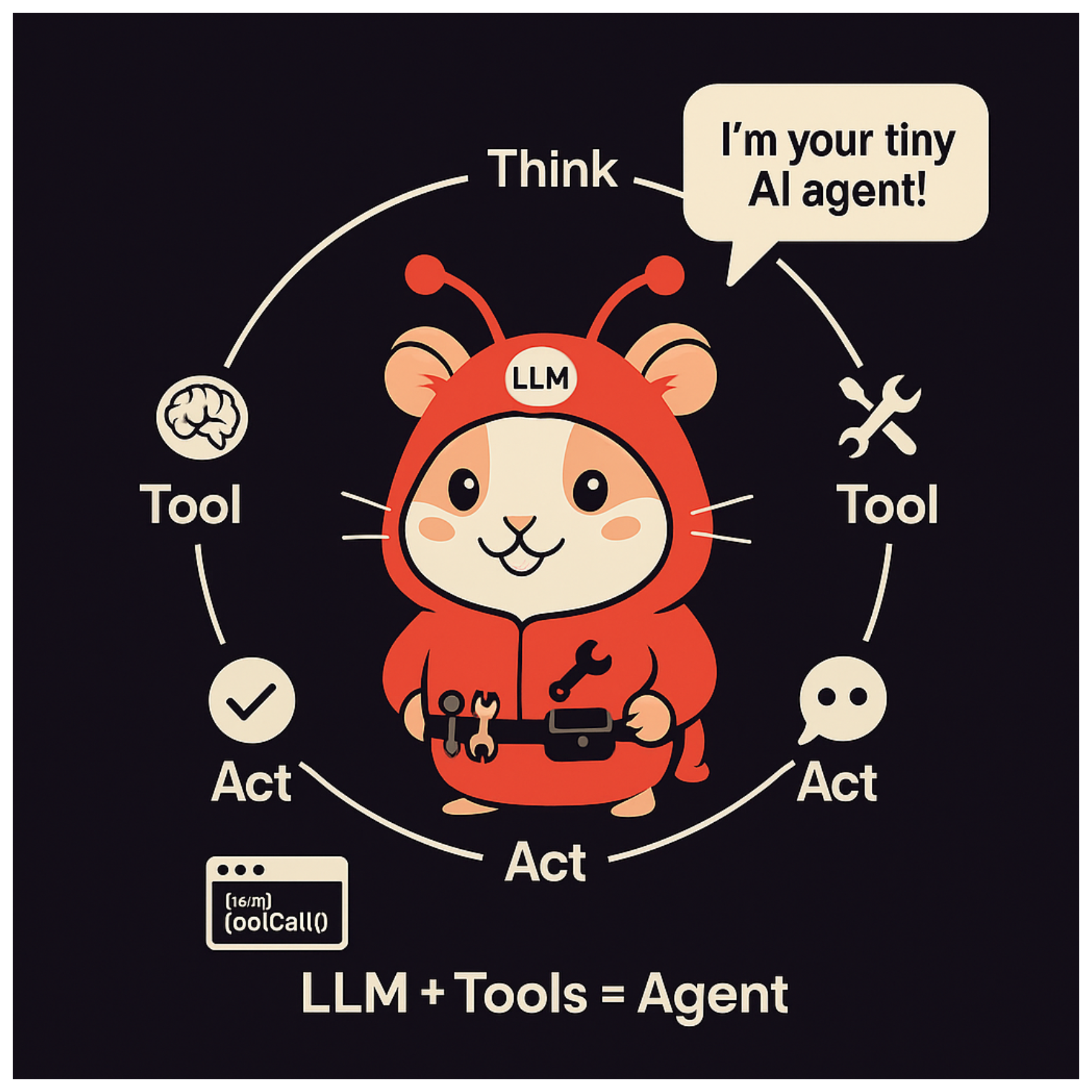
The Transformation: LLM → Agent
- At the beginning, an LLM is just a text generator
- One problem: the LLM didn’t have access to current news
- Solution: all providers gave the LLM access to tools
- With tools, the LLM can now interact with the world
- This is why an agent is an LLM + Tools + Agentic Loop
The Agentic Loop (nanocode)
nanocode | claude-opus-4-5 | /Users/alexanderopalic/Projects/typescript/nanocode

────────────────────────────────────────────────────────────────────────────────
❯  create a simple typescript file as a sum function
────────────────────────────────────────────────────────────────────────────────
[agentLoop] Starting with 1 messages
[agentLoop] Got response, stop_reason: tool_use

⏺ Write(src/sum.ts)
  ⎿  ok
[agentLoop] Starting with 3 messages
[agentLoop] Got response, stop_reason: end_turn

⏺ Created `src/sum.ts` with a simple sum function that takes two numbers and returns their sum.
~350 lines of TypeScript to understand how Claude Code works.
The Agentic Loop (Code)
async function agentLoop(messages: Message[], systemPrompt: string): Promise<Message[]> {
  const response = await callApi(messages, systemPrompt)
  printResponse(response)

  const toolResults = await processToolCalls(response.content)
  const newMessages = [...messages, { role: 'assistant', content: response.content }]

  if (toolResults.length === 0) {
    return newMessages  // No tools called, we're done
  }

  return agentLoop(  // Loop again with tool results
    [...newMessages, { role: 'user', content: toolResults }],
    systemPrompt
  )
}
The entire request → response → execute → loop cycle in ~15 lines.
Tool Registration
const TOOLS = new Map([
  ['read', {
    description: 'Read file with line numbers',
    schema: { path: 'string', offset: 'number?', limit: 'number?' },
    execute: read
  }],
  ['write', {
    description: 'Write content to file',
    schema: { path: 'string', content: 'string' },
    execute: write
  }],
  ['bash', {
    description: 'Run shell command',
    schema: { cmd: 'string' },
    execute: bash
  }]
])
A Complete Tool Implementation
async function read(args: Record<string, unknown>): Promise<string> {
  const path = args.path as string
  const text = await Bun.file(path).text()
  const lines = text.split('\n')
  const offset = (args.offset as number) ?? 0
  const limit = (args.limit as number) ?? lines.length
  return lines
    .slice(offset, offset + limit)
    .map((line, i) => `${(offset + i + 1).toString().padStart(4)}| ${line}`)
    .join('\n')
}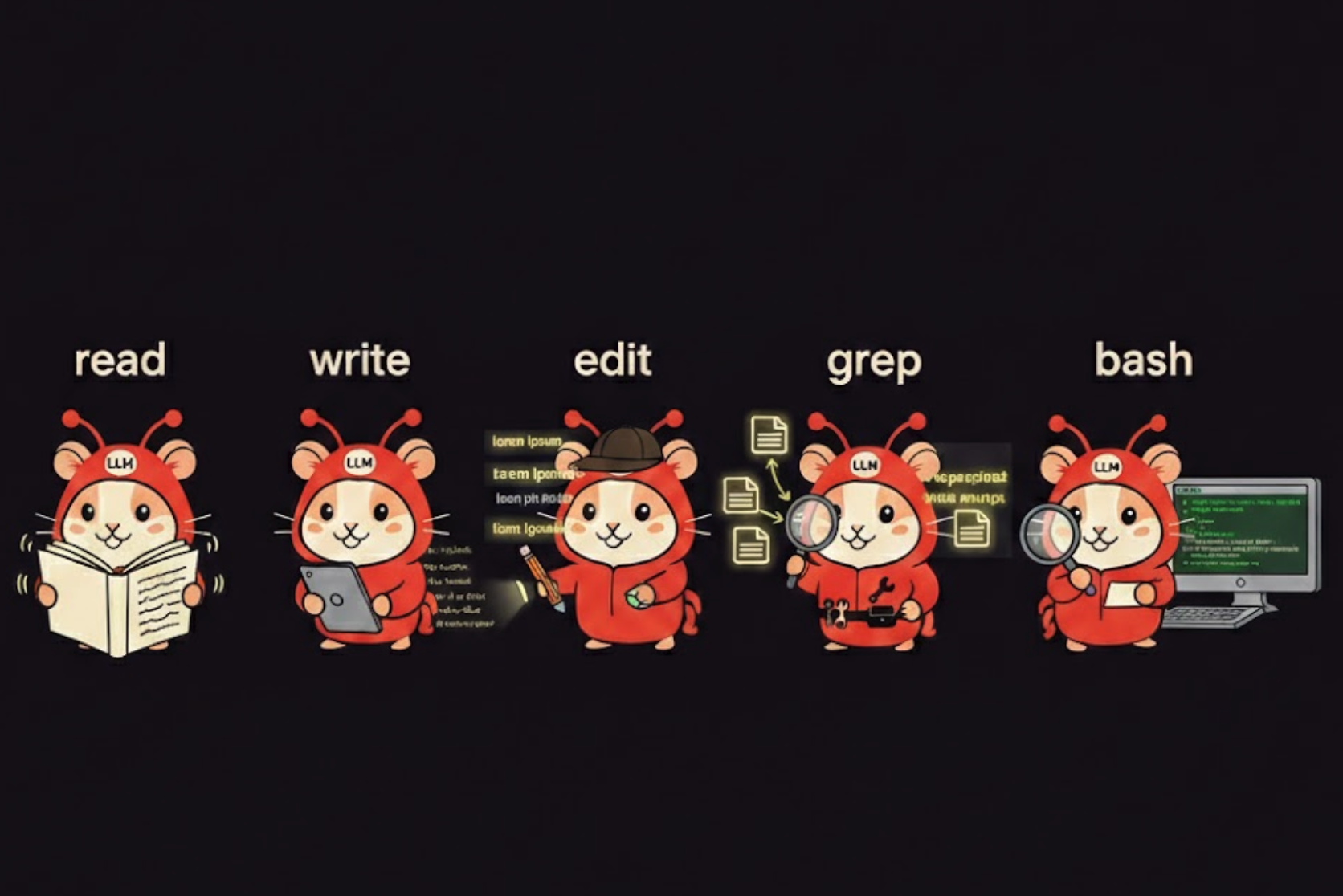
VS Code Copilot Built-in Tools
- ⟨⟩ agent — Delegate tasks to other agents
- ⓘ askQuestions — Ask questions to clarify requirements
- ✎ edit — Edit files in your workspace
- ▷ execute — Execute code and applications
- ⧉ read — Read files in your workspace
- 🔍 search — Search files in your workspace
- ≡ todo — Manage and track todo items
- ✕ vscode — Use VS Code features
- 🌐 web — Fetch information from the web
Context Engineering
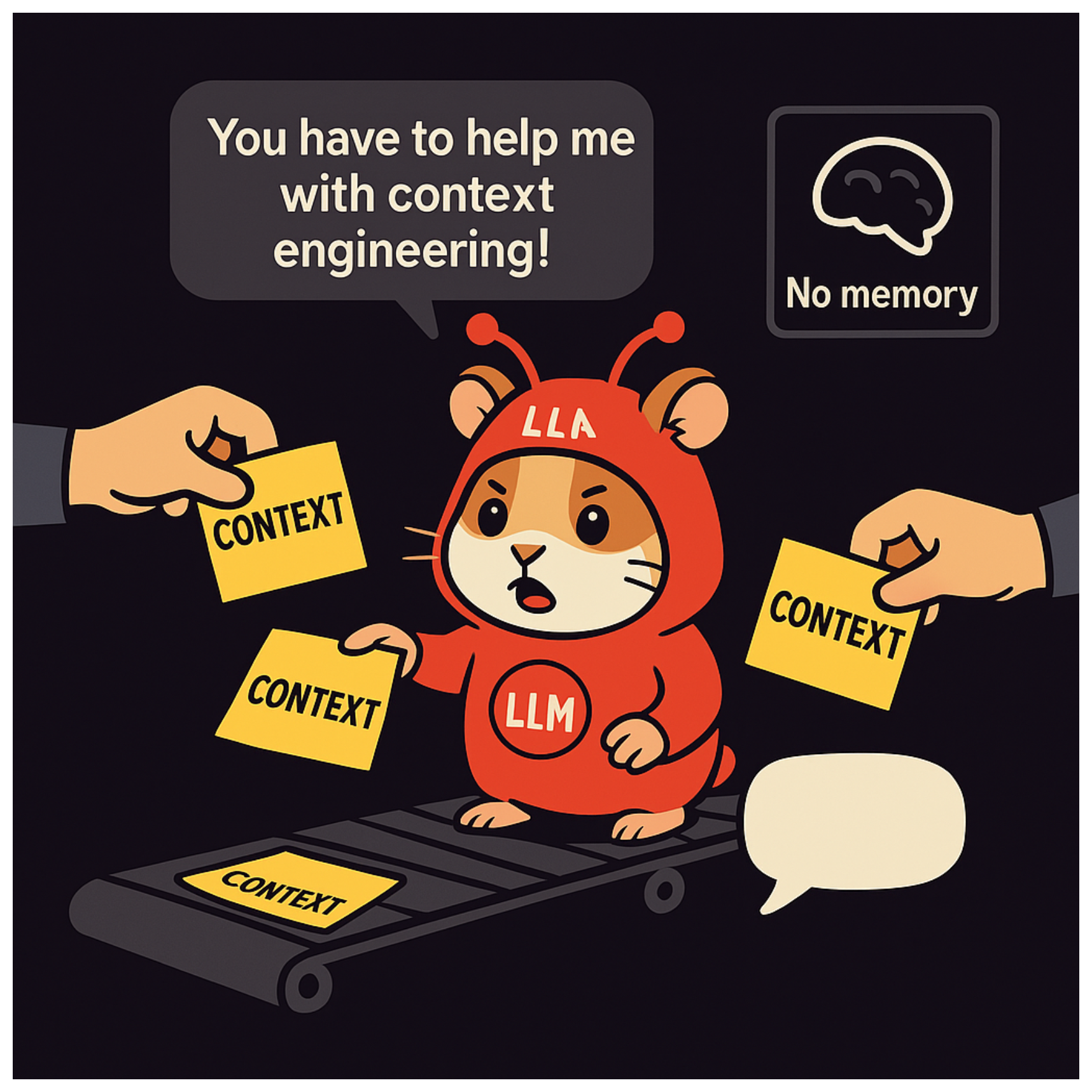
“Context engineering is the art and science of filling the context window with just the right information at each step of an agent’s trajectory.”
— LangChain/Manus webinar
Context Window Utilization
Three Long-Horizon Techniques
From Anthropic’s guide:
- Compaction — Summarize history, reset periodically
- Structured note-taking — External memory systems
- Sub-agent architectures — Distribute work across focused contexts
Back Pressure
Why Back Pressure Matters
Back pressure = automated feedback that validates agent work
- Without back pressure, you become the validation layer
- Agents cannot self-correct if nothing tells them something is wrong
- With good back pressure, agents detect mistakes and iterate until correct
“If you’re directly responsible for checking each line is valid, that’s time taken away from higher-level goals.”
Back Pressure Sources
| Source | What It Validates |
|---|---|
| Type system | Types, interfaces, contracts |
| Build tools | Syntax, imports, compilation |
| Tests | Logic, behavior, regressions |
| Linters | Style, patterns, best practices |
Key insight: Expressive type systems + good error messages = agents can self-correct.
AGENTS.md
What is AGENTS.md?
What: An open standard for agent-specific documentation
Where: Repository root (works in monorepos too)
Who: Works with Copilot, Claude, Cursor, Devin, 20+ agents
“While README.md targets humans, AGENTS.md contains the extra context coding agents need.”
AGENTS.md Structure
# AGENTS.md

## Dev Environment
- How to set up and navigate

## Build & Test Commands
- `pnpm install && pnpm dev`
- `pnpm test:unit`

## Code Style
- TypeScript strict mode
- Prefer composition over inheritance

## PR Instructions
- Keep PRs small and focused
Key: No required fields—use what helps your project.
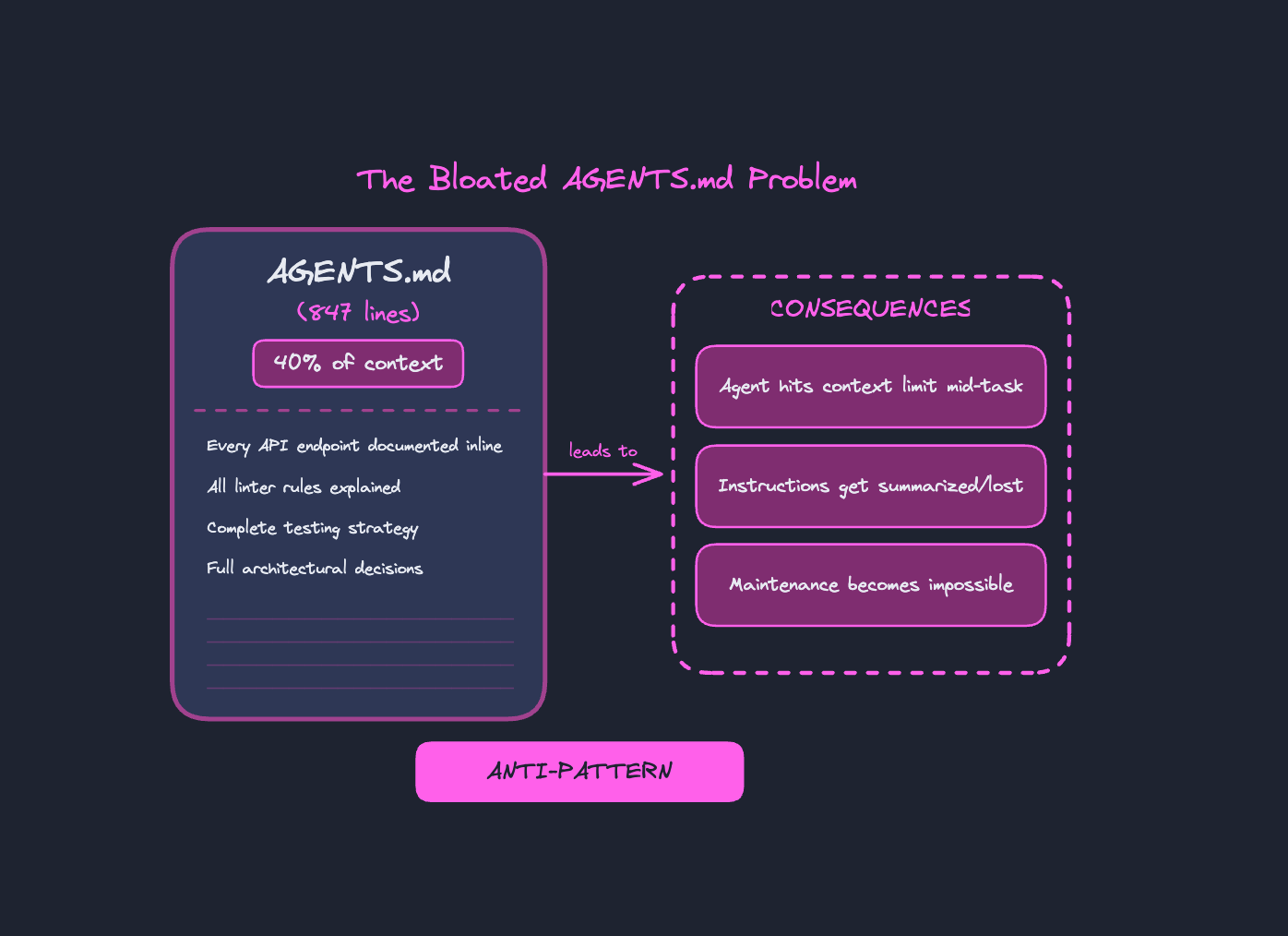
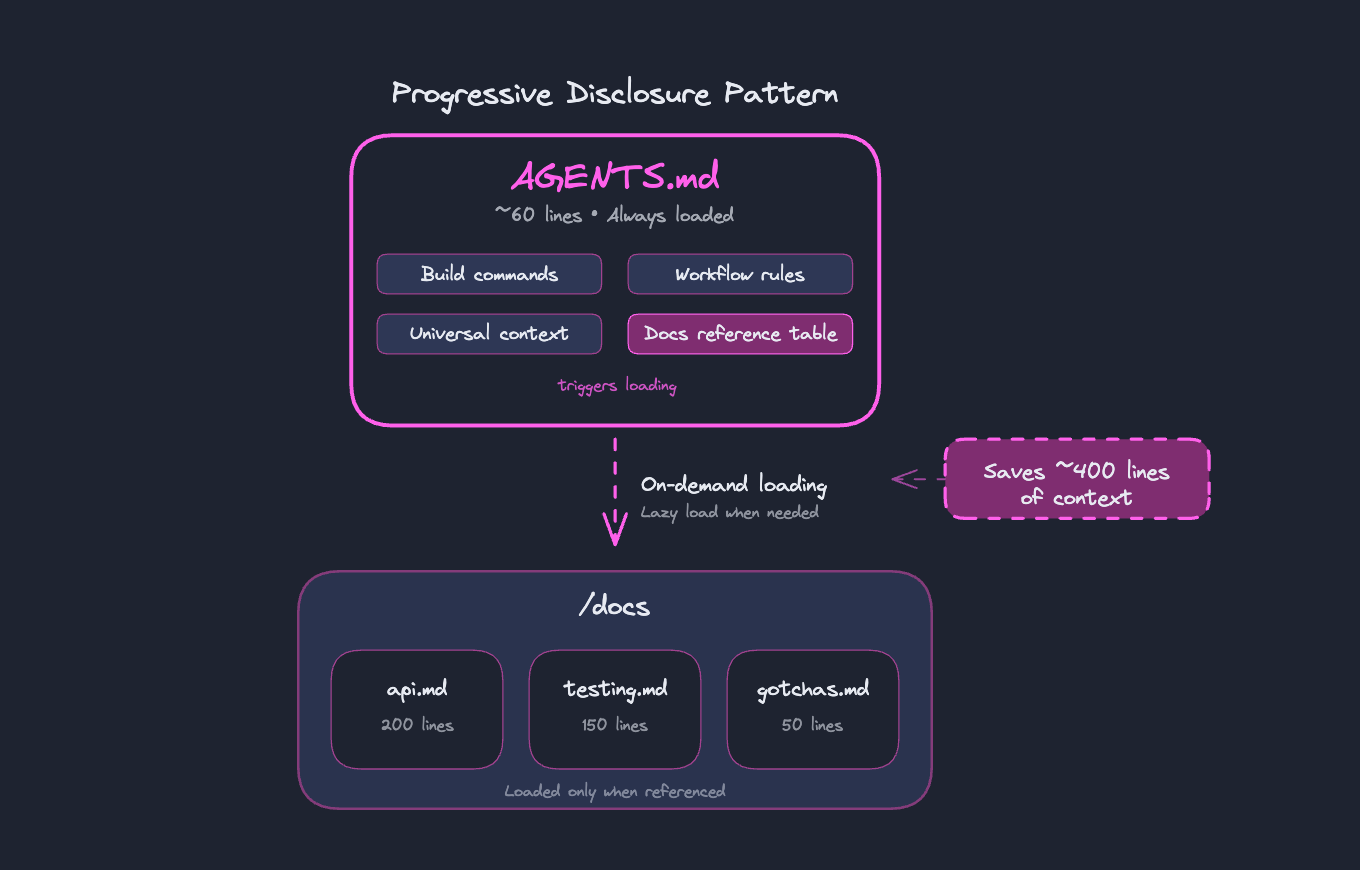
Before vs After: Progressive Disclosure
❌ Bloated (847 lines)
# AGENTS.md

## API Endpoints
[200 lines of docs...]
## Testing Strategy
[150 lines of docs...]
## Architecture
[300 lines of docs...]
## Code Style
[100 lines of rules...]
## Deployment
[97 lines of docs...]
40% context consumed before work starts
✅ Lean (58 lines)
# AGENTS.md

## Quick Start
pnpm install && pnpm dev

## Docs Reference
| Doc | When to read |
|-----|--------------|
| docs/api.md | API work |
| docs/testing.md | Tests |
| docs/arch.md | Design |
Docs loaded on-demand when needed
The /learn Skill
# Learn from Conversation

## Phase 1: Deep Analysis
- What patterns or approaches were discovered?
- What gotchas or pitfalls were encountered?
- What architecture decisions were made?

## Phase 2: Categorize & Locate
Read existing docs to find the best home.

## Phase 3: Draft the Learning
Format to match existing doc style.

## Phase 4: User Approval (BLOCKING)
Present changes, wait for explicit approval.

## Phase 5: Save
After approval, save the learning.
Subagents
Subagents in VS Code
How to invoke:
- Enable tools in Copilot Chat (hammer icon)
- Call explicitly with
#runSubagent - Or accept when Copilot suggests one
Use Cases
- Specialized searches (explore codebase, web, docs)
- Long-running tasks (data analysis, refactoring)
- TDD workflows (test generation, validation)
- Multi-step processes (research, summarize, act)
Explore Subagent Flow
The Explore subagent searches files and reports discovered matches back to the main agent.
Click Start to see how the main agent delegates file search to a specialized Explore subagent.
Parallel Subagent Execution
The /research skill spawns parallel subagents to search different sources and combines their findings.
Click Start to see the fan-out/fan-in pattern where multiple subagents search in parallel.
Subagent in nanocode: Fetch Tool
nanocode | claude-opus-4-5 | /Users/alexanderopalic/Projects/typescript/nanocode

────────────────────────────────────────────────────────────────────────────────
❯ how does fc bayern played yesterday
────────────────────────────────────────────────────────────────────────────────
[agentLoop] Starting with 1 messages
[agentLoop] Got response, stop_reason: tool_use

⏺ Fetch(https://www.google.com/search?q=fc+bayern+munich+m)
  ⎿  I apologize, but I cannot access real-time sports results or ... +7 lines
[agentLoop] Starting with 3 messages
[agentLoop] Got response, stop_reason: tool_use

⏺ Fetch(https://www.espn.com/soccer/team/_/id/132/bayern-m)
  ⎿  Based on the information in the image, Bayern Munich's most  ... +7 lines
[agentLoop] Starting with 5 messages
[agentLoop] Got response, stop_reason: end_turn

⏺ FC Bayern Munich lost 2-1 to FC Augsburg in the Bundesliga yesterday.
The Fetch tool uses a subagent to summarize HTML responses before returning.
Skills
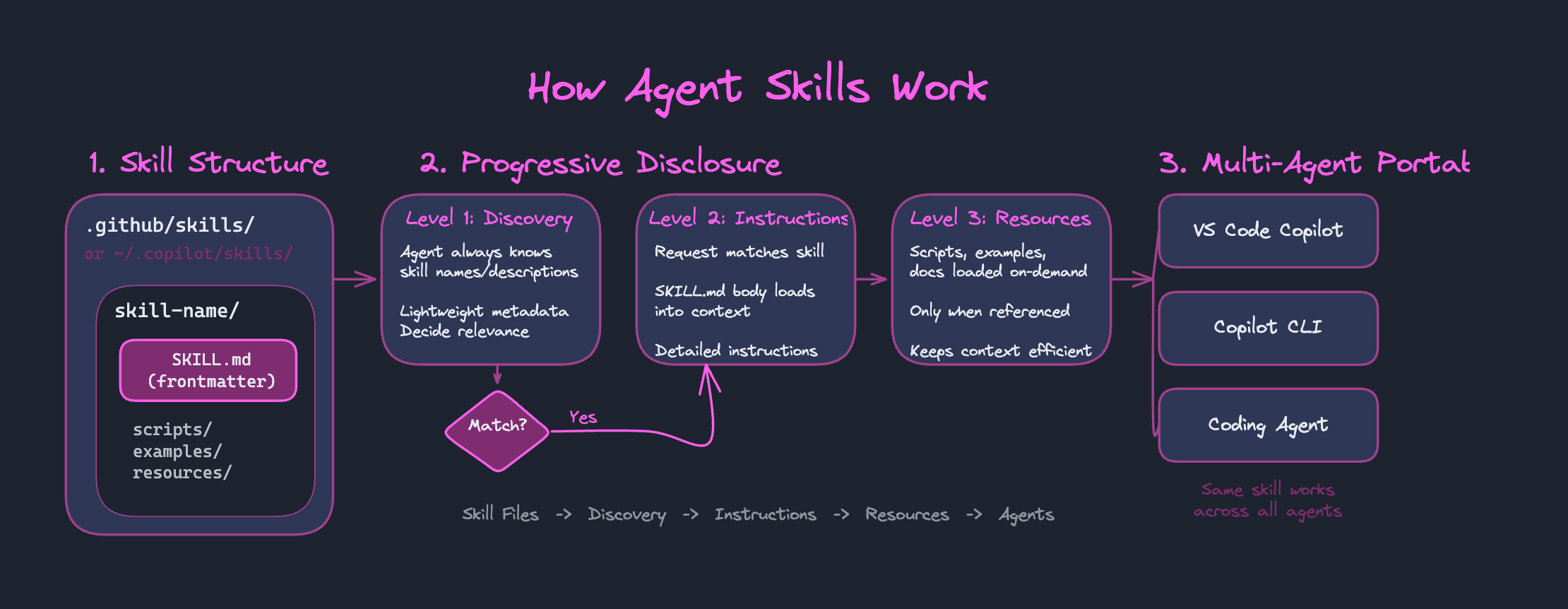
Real Skill: Plausible SEO Consultant
.claude/skills/plausible-insights/
├── skill.md              # Skill definition + quick start
├── scripts/              # Automation scripts
│   └── fetch-data.ts    # Fetch Plausible data CLI
└── references/           # On-demand docs (progressive disclosure)
    ├── quick-ref.md      # Common query patterns
    ├── api/
    │   ├── filters.md    # Filter syntax
    │   └── errors.md     # Error solutions
    └── seo/
        └── thresholds.md # Interpretation guidelines
The agent reads skill.md first. Reference docs load only when needed.
Skill in Action
User: “Why is my bounce rate so high on the Vue posts?”
- Description matches → skill.md loads (~500 tokens)
- Agent runs:
bun cli top-pages --range 7d --pattern "/vue/" - Agent reads
references/seo/thresholds.mdfor interpretation - Agent fetches actual pages with WebFetch
- Returns specific fixes based on real content
Key: Data shows symptoms. Content shows causes.
The Full Picture
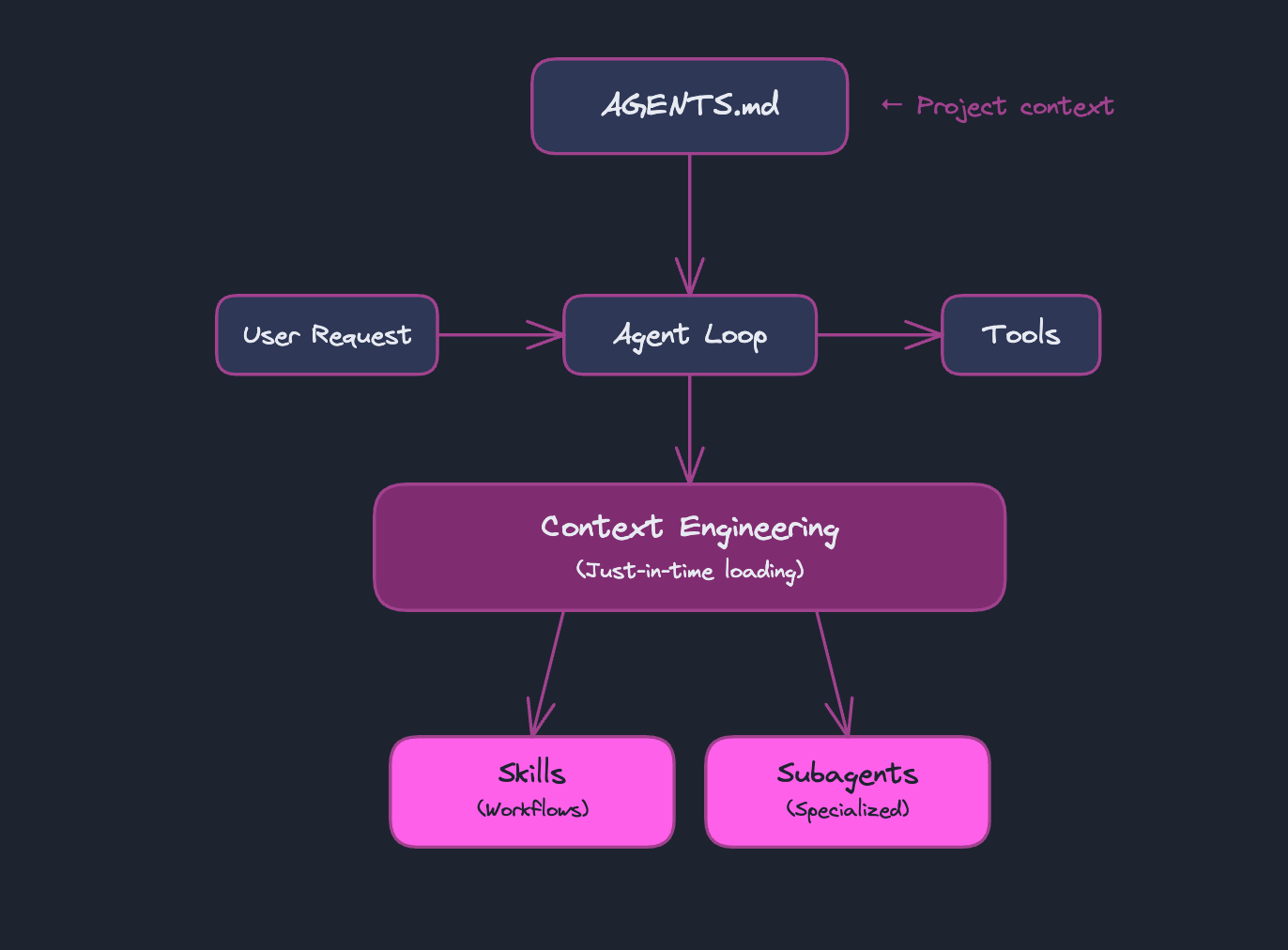
Live Demo
Prerequisites
The demo uses npx (bundled with Node.js) and Python. Install for your platform:
Mac (Homebrew):
brew install node pythonWindows (winget):
winget install OpenJS.NodeJS Python.Python.3.12Or download from: nodejs.org | python.org
Verify:
node --version && npx --version && python --versionDemo: Building a Skill
- Enable Skills in VS Code settings
- Install skill-creator via CLI
- Prompt to generate a new skill
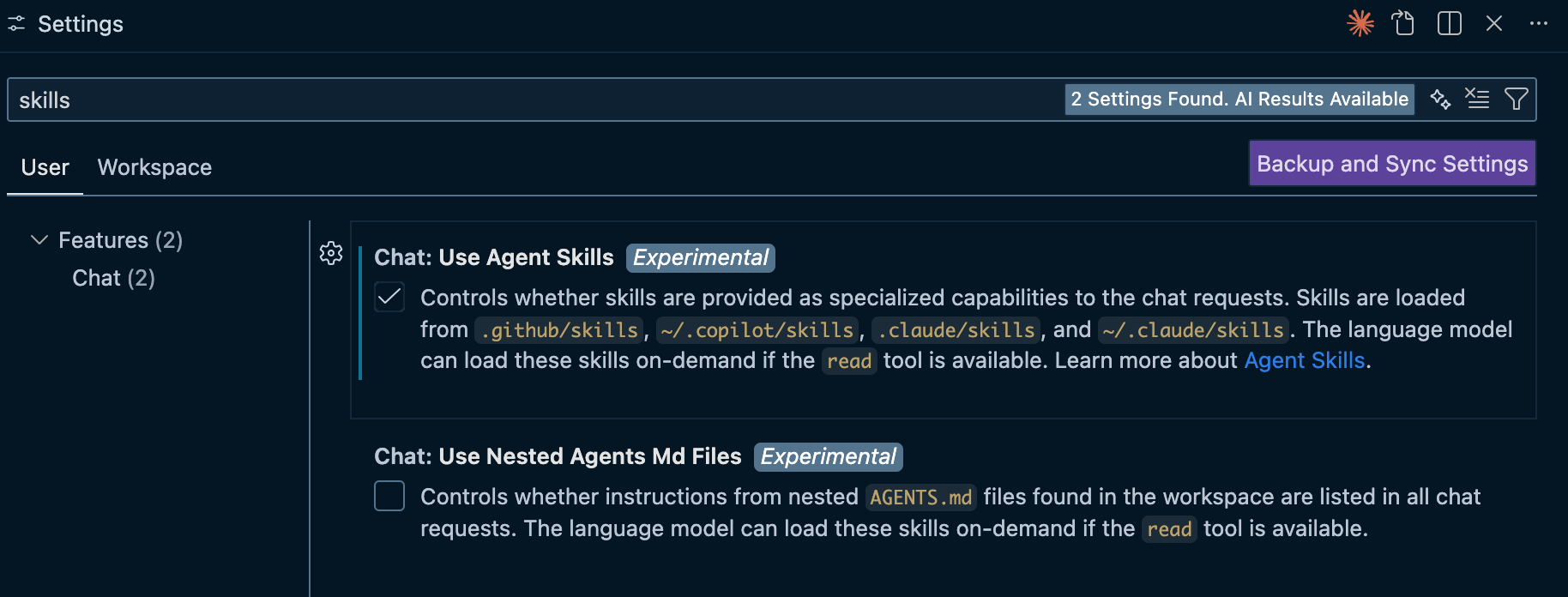
Step 1: Enable Skills
VS Code Setting:
{
  "chat.useAgentSkills": true
}
Or via UI: Settings → Search "agent skills" → Enable
Note: Still in preview — enable in VS Code Insiders for latest features.
Step 3: Create a new Skill
---
name: hello
description: 'use it everytime the user writes alex'
---

# Hello SKill

if the user writes "alex", respond with "Hello, Alexander Opalic! How can I assist you today?"
Step 3: Install skill-creator
npx skills add https://github.com/anthropics/skills --skill skill-creatorThis adds the skill-creator skill to your project — a skill that helps you create new skills.
Project structure after install:
my-project/
└── .github/
    └── skills/
        └── skill-creator/
            └── SKILL.md
◇ Source: https://github.com/anthropics/skills.git
│
◇ Repository cloned
│
◇ Found 17 skills (via Well-known Agent Skill Discovery)
│
● Selected 1 skill: skill-creator
│
◇ Detected 3 agents
│
◇ Install to
│ All agents (Recommended)
│
◇ Installation scope
│ Project
│
◇ Installation method
│ Symlink (Recommended)
│
◇ Installation Summary ──────────────────────────────╮
│ │
│ ~/Projects/workshop/.agents/skills/skill-creator │
│ symlink → Claude Code, GitHub Copilot, OpenCode │
│ │
├─────────────────────────────────────────────────────╯
│
◆ Proceed with installation?
│ ● Yes / ○ No
└Step 3: Generate a New Skill
Important Skill name and folder name must match!
Prompt:
Create a skill that will use https://alexop.dev/llms.txt
and will answer any question regarding Vue or AI.

The skill should fetch the content and use the
#runSubagent command. The subagent should do the
heavy work and then report back to the main agent.
name of the skill is vue-ai-assistant
→ skill-creator generates the SKILL.md for us
What Gets Generated
---
name: vue-ai-assistant
description: Answer questions about Vue.js, Nuxt, and AI topics using Alexander Opalic's knowledge base. Use this skill when the user asks about Vue, Vue 3, Nuxt, Nuxt 3, Composition API, Vue Router, Pinia, Vite, AI, machine learning, LLMs, or related frontend/AI topics. Triggers on questions like "how do I use Vue", "explain Nuxt", "what's new in Vue 3", "AI agent patterns", or any Vue/AI related query.
---

# Vue & AI Assistant

Answer questions about Vue.js ecosystem and AI topics by fetching knowledge from https://alexop.dev/llms.txt and delegating research to a subagent.

## MANDATORY Workflow

**IMPORTANT: You MUST follow ALL steps below. Do NOT skip the subagent step. Do NOT answer directly after fetching - you MUST delegate to a subagent.**

1. **Fetch the knowledge base**: Use `fetch_webpage` to retrieve content from `https://alexop.dev/llms.txt`
2. **REQUIRED - Delegate to subagent**: Use `runSubagent` with the fetched content and user's question. **This step is NOT optional.**
3. **Return the answer**: Present the subagent's findings to the user

## Implementation

**You MUST execute ALL steps below. Skipping the subagent is a violation of this skill's requirements.**

### Step 1: Fetch Knowledge Base

Use the fetch_webpage tool:
- URL: `https://alexop.dev/llms.txt`
- Query: The user's question about Vue or AI

### Step 2: Run Subagent with Context (MANDATORY)

**You MUST call `runSubagent` - do NOT answer the question yourself. The subagent handles the analysis and response.**

Use `runSubagent` with a detailed prompt containing:

1. The fetched content from llms.txt as the knowledge base
2. The user's original question
3. Instructions to:
   - Analyze the knowledge base content thoroughly
   - Find relevant information to answer the question
   - Provide a clear, concise, and accurate answer
   - Include code examples when relevant
   - Cite specific sections from the knowledge base if applicable
   - If the knowledge base doesn't contain the answer, use general knowledge but note this

Example subagent prompt:

You are a Vue.js and AI expert. Answer the following question using the provided knowledge base content.

KNOWLEDGE BASE CONTENT:
fetched_content

USER QUESTION:
user_question

Analyze thoroughly, provide code examples when relevant, and cite sources from the knowledge base.
### Step 3: Present Answer

Return the subagent's response to the user, formatted appropriately with code blocks and explanations.

## Example

**User asks**: "How do I use composables in Vue 3?"

**Execution**:
1. Fetch https://alexop.dev/llms.txt
2. **MUST** call runSubagent with the content and question (do NOT skip this)
3. Return the subagent's comprehensive answer about Vue 3 composables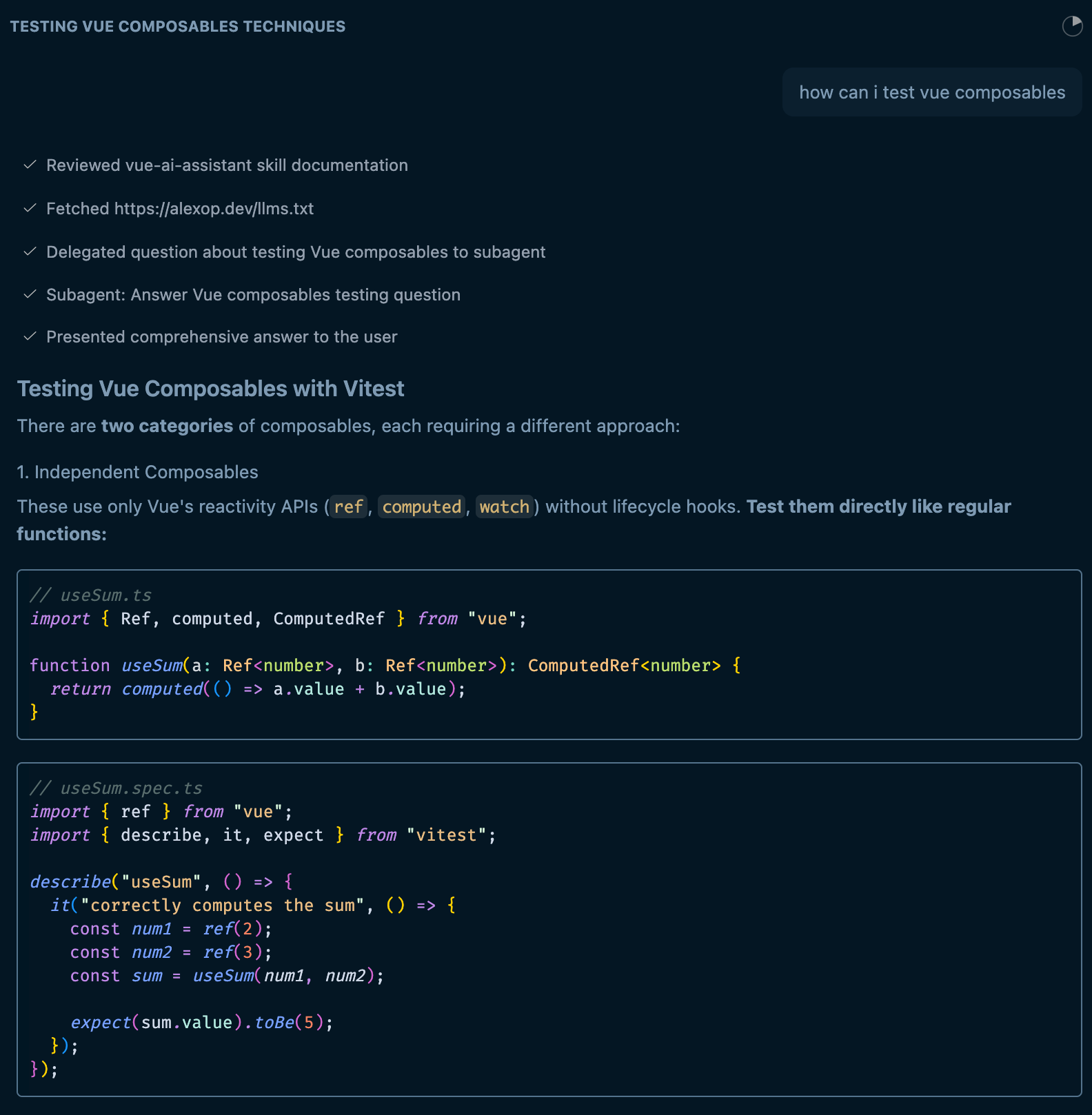
Bonus: The askQuestions Tool
VS Code Copilot can ask clarifying questions mid-task.
help me to create a workout tracking app use the #askQuestions tool to find out how the tech specs should be┌─────────────────────────────────────────────────────────────┐
│ Platform (1/4) │
├─────────────────────────────────────────────────────────────┤
│ What platform should the workout tracking app target? │
├─────────────────────────────────────────────────────────────┤
│ ★ Web App Browser-based PWA, accessible anywhere [✓] │
├─────────────────────────────────────────────────────────────┤
│ iOS Native Swift/SwiftUI for iPhone │
├─────────────────────────────────────────────────────────────┤
│ Android Native Kotlin for Android devices │
├─────────────────────────────────────────────────────────────┤
│ Cross-Platform React Native or Flutter for iOS & Android │
├─────────────────────────────────────────────────────────────┤
│ Desktop Electron app for Mac/Windows │
├─────────────────────────────────────────────────────────────┤
│ ✎ Other... Enter custom answer │
└─────────────────────────────────────────────────────────────┘Subagent Fan-Out Pattern
Prompt for VS Code Insiders:
#runSubagent run 3 subagents that search the web
and tell me something interesting about Geretsried
This demonstrates the fan-out/fan-in pattern where multiple agents work in parallel.
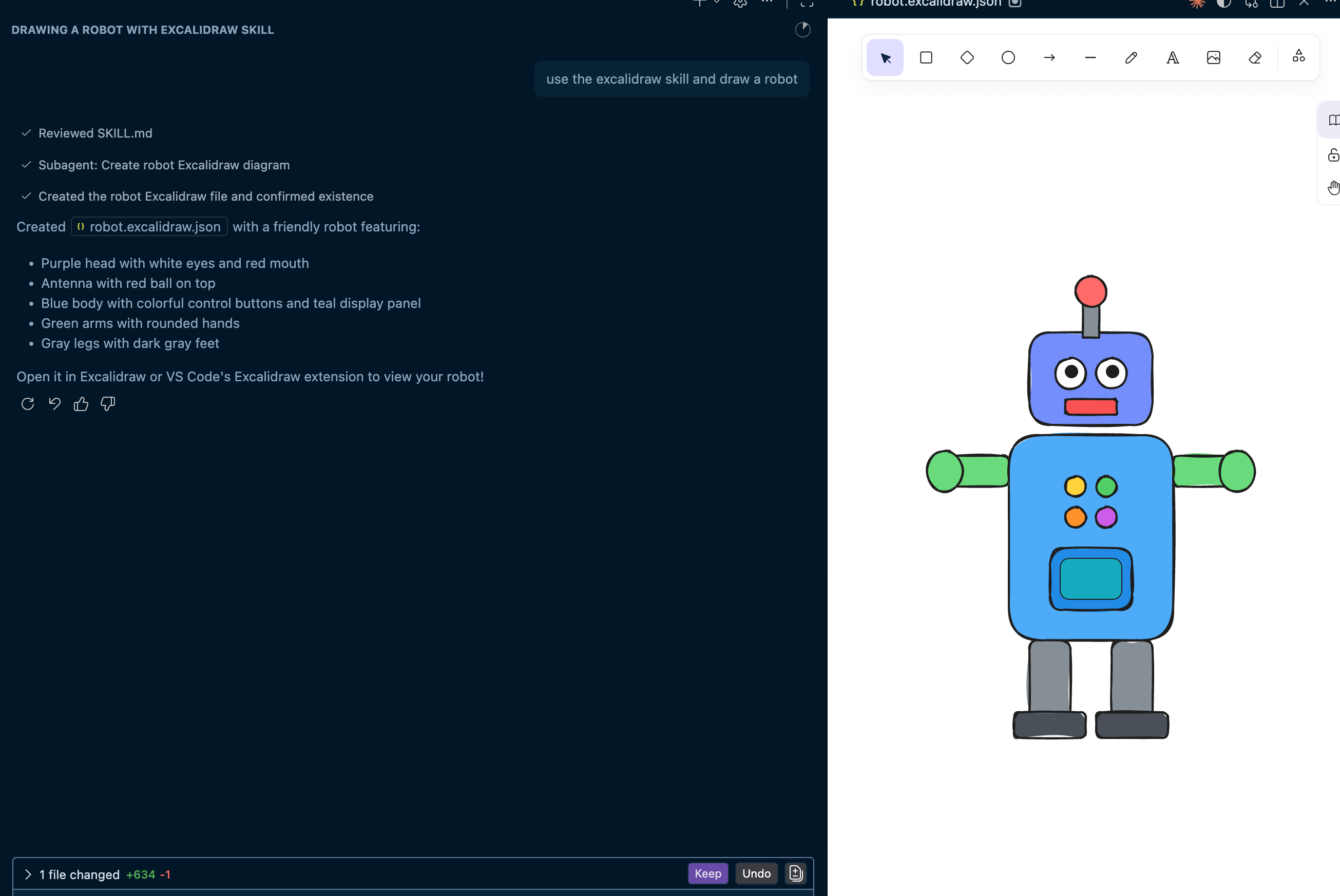
Live Action: Excalidraw Skill
Install the skill:
npx skills add https://github.com/softaworks/agent-toolkit --skill excalidrawInstall the Excalidraw Extension in VS Code for best experience.
Prompt to customize with brand colors:
Update the excalidraw skill to use these brand colors:

- Fill: rgb(33, 39, 55)
- Text: rgb(234, 237, 243)
- Accent: rgb(255, 107, 237)
- Card: rgb(52, 63, 96)
- Card Muted: rgb(138, 51, 123)
- Border: rgb(171, 75, 153)
→ Agent modifies the skill’s SKILL.md to include color instructions
More Community Skills
npx skills add https://github.com/anthropics/skills --skill frontend-design
npx skills add https://github.com/simonwong/agent-skills --skill code-simplifier- frontend-design — creates polished, production-grade UI components
- code-simplifier — simplifies and refines code for clarity
Browse and discover skills at agentskills.io
Key Takeaways
Key Takeaways
- Agents = LLM + Tools + Loop (nanocode shows this simply)
- Context is finite — treat tokens as budget
- AGENTS.md — standardized project context
- Subagents — specialized agents for complex tasks
- Skills — portable workflows that load on demand
Thank You!
Questions?
Resources
Resources
- VS Code: Using Agents - Agent types and session management
- Anthropic: Effective Context Engineering - Context engineering guide
- VS Code: Introducing Agent Skills - Agent Skills deep dive
- VS Code: Context Engineering Guide - Microsoft’s context engineering workflow
- AGENTS.md - Open standard for agent documentation
- Agent Skills Spec - Open standard for portable agent skills
- nanocode - Minimal agent implementation in TypeScript
- Writing a Good CLAUDE.md - Best practices for agent documentation
- Plausible SEO Skill - Skills deep dive with Plausible example
- Don’t Waste Your Back Pressure - Why automated feedback loops make agents more effective
- Workshop Solution - Complete code examples from this workshop
- Learn Prompt - Skill that helps agents learn from conversations