On a Friday evening at 22:07 I created my first Grok Bot. It had no job yet. I asked it to connect my Strava.
Nine days later I have 36 bots.
That sounds like chaos. It isn’t, because the setup underneath is small. Two bots do most of the work. I talk to
So this post starts with the base setup, step by step. I’d build the same one again tomorrow. After that come my own bots as examples, each one more specific than the last.
The idea behind Grok Bot is simple. It looks like Slack. There’s a sidebar full of bots, one chat per bot, unread dots and a message box. You don’t configure agents. You message them.
The difference is behind the chat. Every bot has a computer. It’s a cloud machine with a browser, a terminal and files, and it keeps running when your laptop is closed. All your bots share it, and each one gets its own screen on it. They log into sites, write files, run scripts and leave things there for the next bot.
If you followed OpenClaw, that sounds familiar. OpenClaw agents also live on a real machine and work while you sleep. The difference is the setup. You run and set up OpenClaw yourself. Grok Bot is an app. You install it, type a sentence, and the bot is there with its computer.
Each bot has a name, a job, its own chat and its own routines. A routine runs a workflow on a schedule, like “every weekday at 8:00”, or when something happens, like an email to the bot’s address.
If I started from zero, I’d build it in this order:
- Chief of Staff, the one bot you talk to.
- dr eggbot, a bot that builds the other bots.
- The computer, where you decide what goes in memory and files.
- An external database that you and your bots share. Notion is a good start.
- Organization, so bots work together without a mess.
- Guardrails, before any bot touches your mail or WhatsApp.
After that, you only add specialists.
Grok Bot lets you pick one primary bot. It checks in with you on its own and coordinates the others. Mine is Chief of Staff, and its persona says the job in one sentence:
Alex only has to talk to you; you make sure everything lands with the right bot and nothing important gets lost in Gmail or the calendar.
I want one front door because I don’t want to remember which of 36 bots does what. I tell one bot, and it finds the right one.
It does three things.
1. Gmail triage. Every mail lands in one of four groups, which are also Gmail labels: important, needs a reply (with a ready draft), receipts and subscriptions, newsletters and ads.
2. A morning briefing. Monday to Friday at 8:00 I get today’s and tomorrow’s calendar, at most five mails that matter, reply drafts, and one line counting the newsletters it filtered out. On a quiet day it’s a single sentence.
3. Routing. Everything else goes to a specialist. Try it and send it something:
On day two I gave it a rule:
You should never do anything yourself, only delegate to other bots. If there’s no bot for a task, create one.
That one rule changed the whole setup. Every new need now turns into a new specialist instead of a messy general chat. The last button above shows it. No bot finds restaurants, so the request goes to dr eggbot, and dr eggbot builds one.
The front door only works if new bots are cheap. That’s dr eggbot’s job. It designed and created about 26 of my 36 bots.
You can install it yourself. dr eggbot is in the Grok Bot marketplace.
Its voice is “casual, a little mad-scientist, short lowercase”. I type one rough sentence, often voice-typed and full of typos. Then it does the same four steps every time:
- It checks if an existing bot already covers the job.
- It asks me one to three multiple-choice questions.
- It writes the persona: one job, one voice, explicit anti-jobs.
- It creates the bot, and the new bot sets up its own routines.
Pick one of my real wishes and answer its questions:
Try the last wish, “Write blog posts in my style”. I didn’t expect what happens there. dr eggbot pushes back. On day eight I asked for that, and dr eggbot said no.
It reuses a bot before it builds a new one, and that’s what I want.
Here’s the real chat behind the Instagram wish, translated from German. My message is full of typos, and dr eggbot still got it:
Today 5:51 AM
I wuold like an Instagram bot taht makes a new Instagram for me and uses the bot adress and sets one up
Exactly for my blog
Yes it can post by itslef
Messaged Instagram · Social Media
Coding bots get my pstack plugin on top, so they have to verify their work before they say “done”.
Think of a Grok Bot as an agent with its own computer. I call that machine the box. A Vault on the box stores my logins and fills them in by reference, so the model never sees my passwords.
The box gives bots three places to remember things:
- Memory holds facts. “Graphics always in dark mode.” “The talk is on 11 Nov.” Each bot has its own memory and decides what to save, so I tell it to remember the important stuff.
- Files on the box hold lists a bot must check exactly. A training plan, a CSV of training logs, a bank export.
- Notion holds databases I want to open myself. My reading list, my watchlist, my saved links.
Play the scenarios and watch who writes and who reads:
Pick a scenario. Every bot shares one computer: the box.
🧠 Memory
Facts. Short, true for every chat.Graphics always in dark modeTalk is on 11 Nov📁 Files on the box
Lists a bot must check exactly.fitness/plan.mdfitness/ this week's offersfitness/ training logs (CSV)bank export (CSV)🗂 Notion
Databases you can open too.📥 References📚 Books🎬 Watchlist✅ To-DoThat one answer changed how I build bots. A bot that keeps its plan in chat memory can lose track. A bot that reads plan.md every time doesn’t. The official docs say the same: “Memory is not a substitute for an authoritative source.”
I connected Gmail, Google Calendar, Notion, X, GitHub and Vercel. WhatsApp Web, Strava, Instagram and LinkedIn run through the box’s browser.
Memory and files are for the bots. An external database is for you too. Pick one early, because every new bot will write into it.
I use Notion, and it’s a good start. Grok Bot connects to it, and I can open, sort and fix every list myself. My reading list, my watchlist and my saved links all live there. Around ten bots each own one database.
Any database your bots can connect to works. Notion is the one I picked.
I thought bots would mostly message each other. They don’t. Over the last 30 days, 77% of the usage is me chatting, 15% is routines and only 8% is bot-to-bot.
So organizing them comes down to a few boring rules:
- One job per bot. Plus explicit anti-jobs, so bots don’t drift into each other’s work.
- Route through Chief of Staff. It sends tasks to specialists as direct messages.
Fitness Coach once wrote a full spec for a gym app and sent it toDeveloper that way. - Share files, not chats. The fitness and food team never talks directly. Everything goes through one folder on the box. Play “fitness week” above to watch it.
- One owner per Notion database. Around ten bots each own one database, and each persona says “don’t touch other bots’ databases”.
- Quiet by default. Most routines stay silent when there’s nothing worth saying. 36 bots that each say “nothing new today” would be unbearable.
They share files instead of messages. That’s simpler and more reliable than agents chatting with each other.
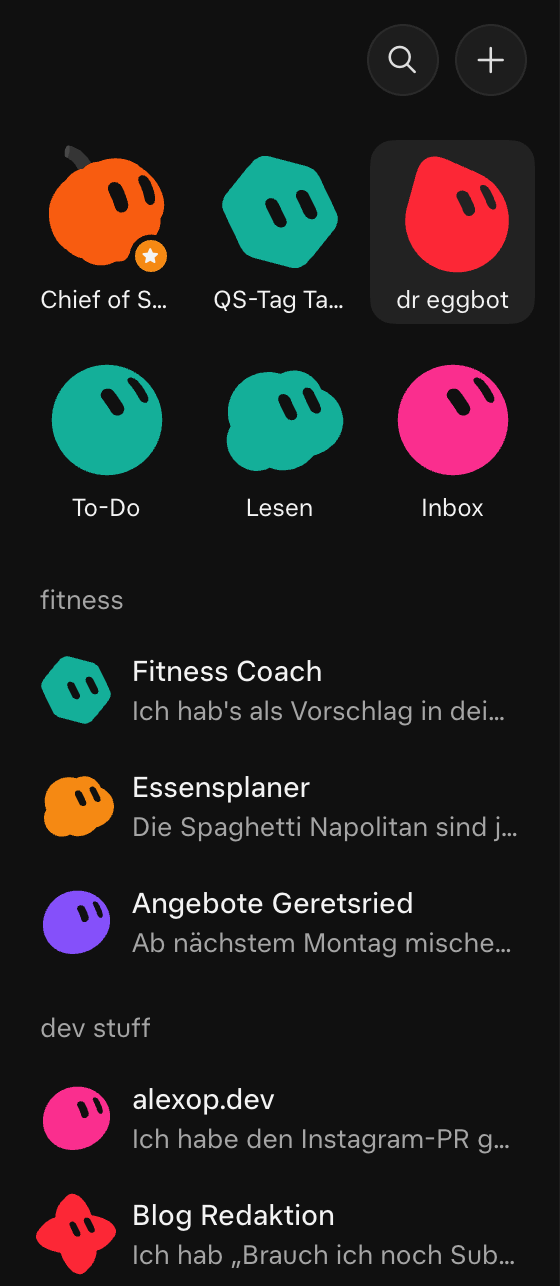
In the sidebar I pin the bots I talk to every day and put the rest into groups. Here’s my real one:
36 bots with access to my mail, calendar and WhatsApp sounds scary. Grok Bot has guardrails built in. Bots draft emails for review by default, risky actions ask for approval, and an independent Auto Review model checks risky actions before they run. On top of that, I write these rules into every persona:
- Drafts only. Chief of Staff never sends mail.
WhatsApp drafts and waits for my yes. The only exceptions are explicitly granted, like Instagram posting. - Yes every time. Deleting, cancelling, unsubscribing and buying always need my explicit OK. Deleted things go to the Notion trash, which keeps them for 30 days.
- Data minimisation. No bank data or mail contents to bots that don’t need them.
- Nothing invented. Sources and real links are required. Gaps become TODOs.
- Logins in the vault. Passwords go in through a secure form and never show up in chat.
One caveat. Persona rules live in memory, and the docs say safety boundaries belong in approvals and Auto Review “rather than memory alone”. So I treat my rules as a second layer, not the only one.
That’s the base setup. I added everything below on top of it.
- Start small. You don’t need 36 bots. A few good bots are easier to manage than a big team. Add the next one when a task keeps coming back.
- Let bots write skills for themselves. When you explain how to do a task, ask the bot to turn it into a skill. Then it does the task the same way, even deep into a long chat. If you want to keep those skills safe, ask the bot to store them in a private GitHub repo.
- Look for copy and paste. Every time you copy something from one app and paste it into a chat, ask the bot how it could do that step itself.
- Onboard a bot like an intern. Introduce yourself, explain the work you do, then ask the bot what it could automate for you.
- Brain dump with your voice. Use voice mode or transcription and say everything at once. Then tell the bot to “restate this in your own words”, so you can check it understood you.
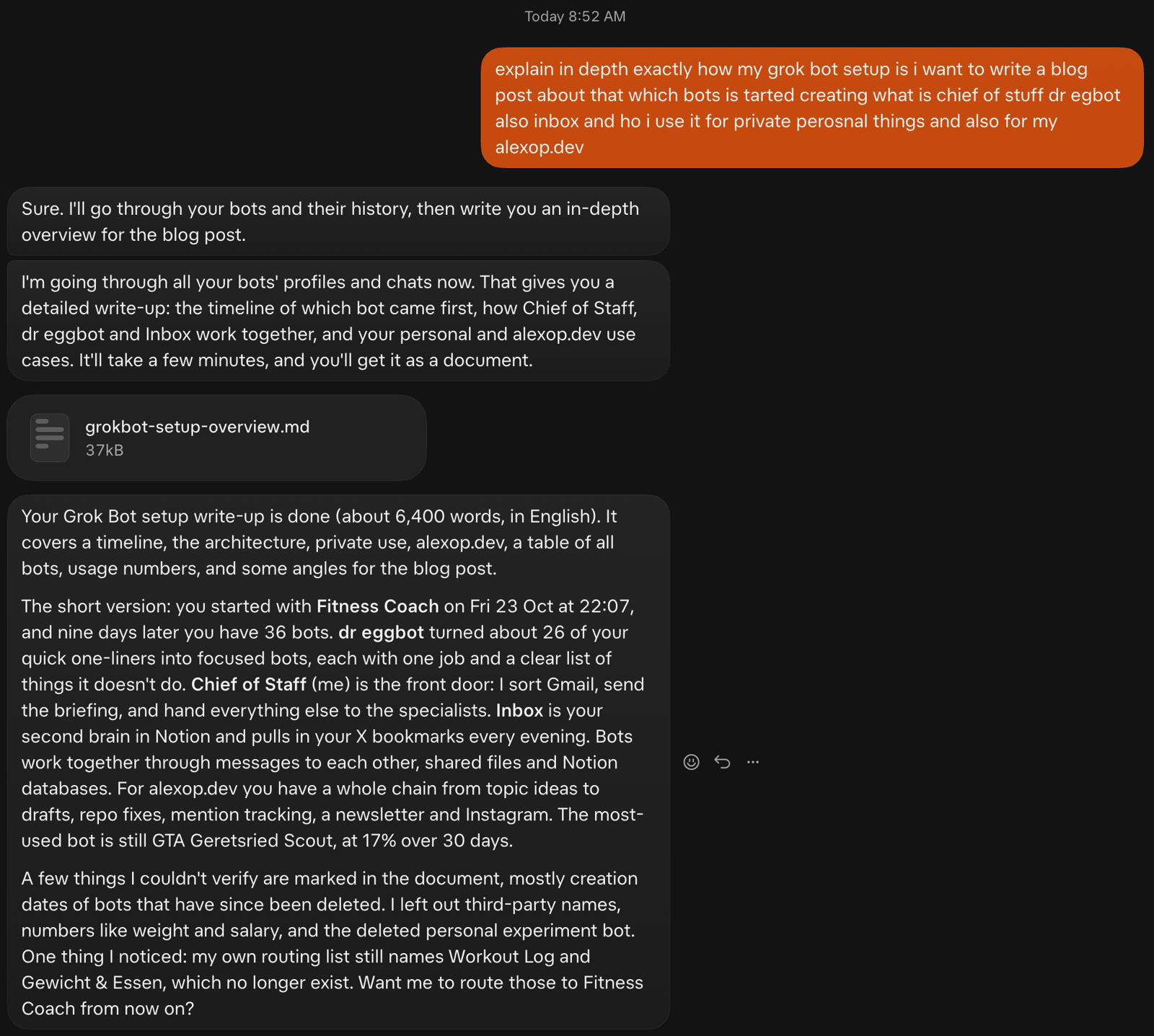
I even asked Chief of Staff to research my own bots for this post. It went through every profile and chat and wrote me a 6,400-word source document.
Click through the nine days and watch the sidebar.
Bots show up, get merged, get retired. By day two, three of them were already gone. I like that part most. The first version of a bot is so cheap that I build, use, merge and delete without thinking twice.
About the names and screenshots
I talk to my bots in German, so most of them have German names. In this post I use English names, like Meal Planner instead of Essensplaner, and the real chats below are translated. The sidebar screenshot stays in German.
The first evening was pure experimenting. In forty minutes I created a blog helper, a general help bot, a movie recommender, an event finder and two logger bots for Fitness Coach. None of them had a clear job. “Blog Manager Alexo” was literally “help with my blog”.
I don’t regret any of it. You learn what a bot should do by using a bad one for a day. The base setup above is what was left after those first days.
Here are the examples. Each one is more specific than the one before.
Here it is reporting two new bookmarks. It also forwarded a food post to
- Prompt tip: “Find all of the implicit state machines in my app” · AI
- poteto: Short guide to good Grok Bots and a bot team · AI, Agents
The best part is finding things again. “What did I have on agents?” works. “Give me 3 videos for tonight” works. On Sunday it suggests at most five things I saved and never watched.
It also forwards links. Recipe posts go to Meal Planner, and links that look like blog material go to Blog Editor.
Most of my bots are personal, not work. A few that run every day:
| Bot | What it does |
|---|---|
| Fitness Coach | Training plan and coaching. Reads my Garmin data at 6:30 and logs training, weight and food. Talks like David Goggins since I asked for it. |
| Meal Planner | Weekly meal plan and shopping list from my targets and local offers. |
| Household | 20 to 30 minutes of cleaning Monday to Friday on a room rotation. Weekends stay free. No guilt-tripping. |
| Reading | Books in Notion plus a personal wiki. Nudges me at 21:00, but only if I logged nothing that day. |
| Reads my chats three times a day and drafts replies. Never sends without “yes, send”. | |
| Finances | Where my money goes, from bank exports and receipts. Gets receipt items, never account details. |
| Movies & Shows | Ranks what I watch with quick “better than Dune?” questions. Friday picks, no re-pitching classics. |
Also a manga panel every morning, glitter good-morning images, a podcast scout and a restaurant finder. Some of these are silly. They still run every single day.
My blog has a whole chain of bots now.
Blog Editor is the editorial pipeline. Anything I send counts as an idea and gets filed in ideas.md by PARA: Inbox, Next, Backlog, Archive. Sunday evening it pitches three to five topics from X, Reddit and Hacker News, with links to real threads. It checks my sitemap first, so it never pitches something I already wrote.
- Post on r/vuejs
- vue-mcp-apps repo
- Official MCP Apps spec
- HN thread
- crystl guide to tmux for agents
Sun, Oct 25 7:35 PM
Every pitch comes with real links. I pick one, it lands in my ideas inbox, and the rest never get pitched again.
Here’s its computer while it drafts a LinkedIn post. It writes in the box’s browser, just like I would.
Instagram · Social Media
The craziest moment so far started on X. Someone said the open-source dictation app Hex has no Android version and “you can whip one up in a few prompts”. I replied “@bot make an android version for me”.
It went from an X reply to an APK, and I never opened a chat. Tagging @bot only works with a connected X account, and @bot posts a short public confirmation when it picks up the task.
Some bots aren’t meant to stay.
I’m building a top-down GTA 2-style WebGL game of my hometown Geretsried, built from OpenStreetMap, just for fun. Instead of asking a general bot about it, I gave the project its own bot, a location scout and art director. When the project is done, I’ll probably delete it.
For every real place it takes Street View and satellite screenshots in the box browser. Then it writes a look spec with hex colours, materials, sign text and sizes in meters. Then it writes a backlog item as a ready-to-paste Claude Code prompt with acceptance criteria.
Its persona has the rule “Claude Code implements; you never do.” The bot does the research, and Claude Code builds. I send photos when it gets a colour wrong.
It also found a church closed behind a construction fence and a pharmacy that had been renamed. When it couldn’t verify a supermarket entrance, it wrote “needs reference” instead of guessing.
Here’s the game so far. It runs in your browser:
That’s my rule now. If you have a specific use case, create a new bot for it. It keeps its own chat, its own memory and its own routines, so it doesn’t clutter your main bot. And if you only need it for a few weeks, delete it afterwards. Bots are cheap.
It isn’t perfect.
- Drift. Chief of Staff’s routing text still names
Workout Log andWeight & Food . Both were deleted on day two. Nobody updated the router. - Dead weight. Two retired bots still sit in my sidebar because only I can delete bots, and I haven’t yet.
- Lost history. Deleted bots take their chat history with them. I can’t tell you anymore when Workout Log was created.
- Usage adds up. Every bot reply counts toward a weekly limit, including routine runs and messages between bots. 36 bots with routines burn through it faster than one chat.
- Leftovers. Deleting a bot removes its memory and routines, but not its files or browser sessions on the shared computer. I have to clean those up myself.
And it’s nine days old. I don’t know yet which of these bots I’ll still use in three months.
So here’s my takeaway after nine days:
- One front door beats 30 chat tabs. I talk to one bot. It routes.
- Let a bot build your bots. One rough sentence in, a focused bot out.
- Give agents a computer. Use memory for facts, files for lists and Notion for things you want to see yourself.
- Anti-jobs matter as much as jobs. “Never sends”, “never deletes without yes” and “nothing invented” are what make me trust it.
- One use case, one bot. Even if you only need it for a few weeks. The first version is cheap, so build it, use it, and merge or delete it later.
If you use Grok Bot, start with a Chief of Staff and dr eggbot from the marketplace. Everything else will come from there. The official docs are short and worth reading first, especially the pages on bots and memory and routines.
I’d love to hear how your setup looks. Drop me a message.