explore-qa is a small Bun runner I built to drive AI agents through exploratory QA sessions. You give it a charter (“explore the basket flow with a mobile viewport”), pick an agent (Claude, Codex, or Copilot), pick a browser CLI (agent-browser or playwright-cli), and it runs the session. You get back a Markdown report shaped like a real tester’s notes: SBTM sections, PROOF debrief, screenshots, full JSONL session log.
About 500 lines of TypeScript plus a folder of Markdown. Site-agnostic by construction.
Just want to try it?
Repo: github.com/alexanderop/explore-qa. Use it as a template, clone it, and run the /onboard-site skill to wire it up to your own site. You’ll need one of Claude Code, Codex CLI, or GitHub Copilot CLI installed to drive the runs.
git clonethe repo,bun install,bun link- Open the folder in Claude Code and run
/onboard-site https://yoursite.com qato pick a charter, agent, and browser in an interactive wizard- Read the report under
qa-runs/charters/<charter>/
Before the deep dive, here’s what this actually produces. On a recent run against otto.de’s mobile nav, Codex flagged a small UX bug: the Filter button (bottom right, highlighted in pink) is rendered on the category overview panel, where there are no products to filter yet. It only belongs on the product listing screen, one level deeper.
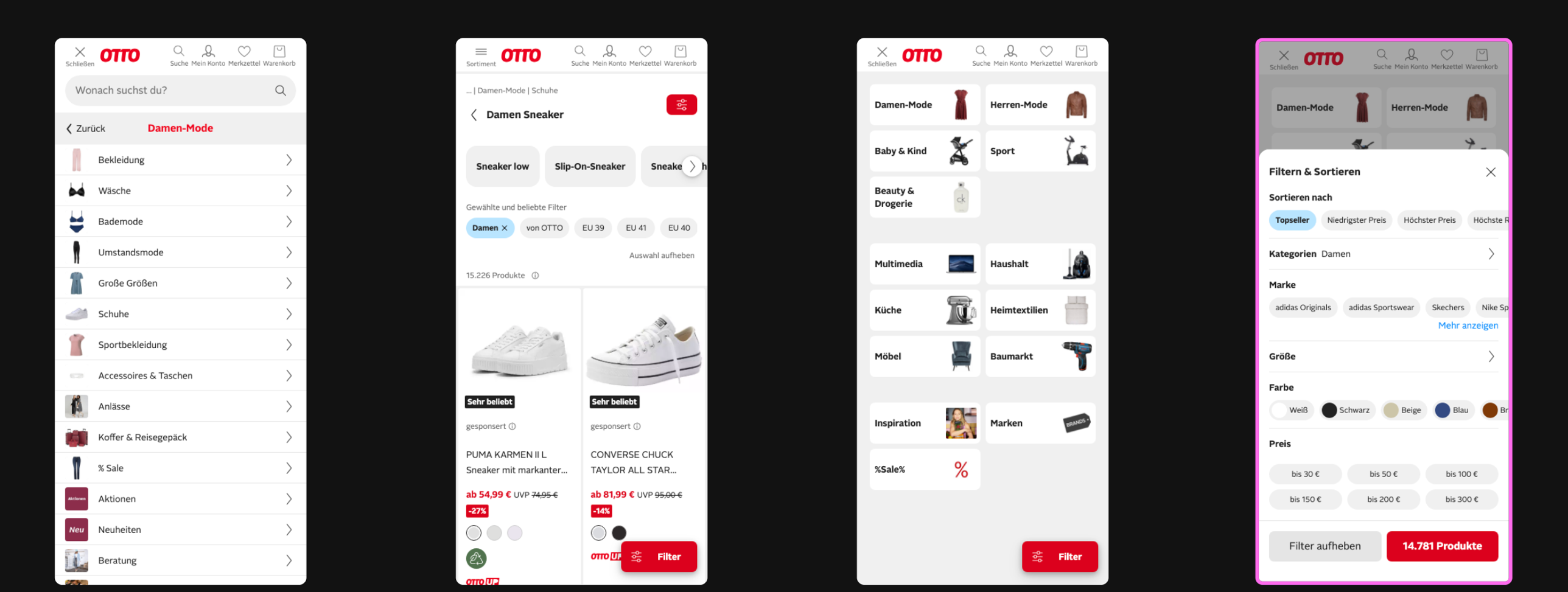
Nothing broken, no broken-image 404, no crash. The kind of small consistency bug a scripted E2E suite would never notice because nobody wrote a test for “is the filter button absent on this screen.” An agent browsing the menu the way a user would noticed it in under seven minutes.
Most “AI testing” demos I see lean one way: Playwright on autopilot. A script, some selectors, an LLM picking the next click. It passes green, nobody learns anything about the site, and the bug that shipped to production wasn’t in the happy path anyway.
I wanted the opposite. A tool that behaves like a QA engineer on their first day. Point it at a website. Give it a one-line mission. Let it browse, notice what’s weird, file what it finds, and hand back a report I can triage in ten minutes. Agents are the first tool that make this economical: one tester per charter, parallel, at roughly the cost of a cup of coffee per run.
- Charter, one file, one mission. “Explore X with Y to discover Z.”
- Site profile, one file per site. Base URL, viewport, known quirks.
- Harness, composes a prompt from Markdown fragments, spawns the agent, captures the session.
- Output, a Markdown report with SBTM + PROOF sections, screenshots, and a full JSONL session log.
No hard-coded selectors. No page.click('.btn-checkout'). The agent reads agent-browser --help at the start of every run and figures out the CLI from scratch. That keeps the harness site-agnostic.
In one picture:
You write the charter. The harness builds the prompt. The agent runs the session. You read the report.
Scripted Playwright and Cypress suites do one job well: catch regressions in flows you already know about. They are bad at:
- ❌ Finding issues nobody thought to write a test for
- ❌ Catching layout breaks on the mobile viewport
- ❌ Noticing 404s on the third-party tracking pixel
- ❌ Spotting a consent banner that ate the tap target
- ❌ Doing an a11y pass on the page you just changed
Exploratory testing is the opposite discipline. Kaner & Bach’s definition is worth quoting because most people get it wrong:
Exploratory testing is simultaneous learning, test design, and test execution.
Learning, test design, and execution happen in parallel, not sequentially. Scripts come after, not before. Humans are great at it. LLMs turn out to be surprisingly good at it too, if you build the harness right.
Each one does exactly one thing.
You write a charter. You point it at a site. The harness composes a system prompt plus a user prompt, spawns the agent CLI in fully permissive mode, and the agent drives the browser for the next 5 to 10 minutes while writing a report.md.
A charter looks like this:
---
name: otto-pdp-basket
includeFragments:
  - _browser-workflow
  - _report-format
---

# Charter: add to basket from PDP

## Mission

> Explore **the product detail page → basket flow**
> with **a mobile viewport, no login, a cold cookie**
> to discover **whether a user can add an item and see it in the basket**.

Time box: ~5 minutes.

## Risks / oracles

- Size picker blocks add-to-basket on mobile
- Consent banner obscures the CTA
- Basket count doesn't update after add
That’s it. No code. The harness handles everything else.
The prompt isn’t in TypeScript. It’s in Markdown fragments.
prompts/
├── _system.md           ← always loaded: "you are a precise, honest QA engineer"
├── _honesty-checks.md   ← always loaded: "don't invent findings"
├── _browser-workflow.md ← opt-in: "read {{browser}} --help first"
└── _report-format.md    ← opt-in: SBTM + PROOF report shape
Want to make the agent more aggressive? Edit the Markdown. Want a new report section? Edit the Markdown. There’s no DSL, no YAML template, no indirection layer between you and what the agent reads. The prompt is the config.
Rules in _system.md apply to every run. Rules in _browser-workflow.md only load when a charter opts in via includeFragments. Charter bodies stay short because the rules aren’t duplicated across every file.
Composition is a fan-in:
Five or six Markdown files in, one deterministic prompt bundle out. The promptHash is what later lets compare-runs.ts separate a prompt change from model variance.
Early versions of the harness had backend-specific CLI snippets baked into the prompt. Things like agent-browser session start --mobile. It worked, until agent-browser shipped a new subcommand and half my charters broke overnight.
The fix is one line in _browser-workflow.md:
Before your first action, run
{{browser}} --helpand read it. Use the commands you see in the live help, not commands you remember.
Now the harness is backend-agnostic by construction. Swap agent-browser for playwright-cli in qa.local.json, and the same charter runs against a different CLI with zero prompt changes.
✅ Agent reads live help, uses current commands ❌ Agent relies on memorized subcommands, breaks on every CLI update
Here’s what the actual invocations look like for the same charter on each backend. I pulled these from Claude Code’s CLI reference, Codex’s exec reference, and GitHub Copilot CLI’s docs. They all do roughly the same thing. None of them agree on how to do it.
Claude Code:
claude -p "$PROMPT" \
  --model claude-opus-4-6 \
  --output-format stream-json \
  --include-partial-messages \
  --verbose \
  --append-system-prompt "$SYSTEM_PROMPT" \
  --add-dir "$RUN_DIR" \
  --permission-mode bypassPermissions
Codex CLI:
# Codex has no --system-prompt flag. It reads AGENTS.md from --cd.
echo "$SYSTEM_PROMPT" > "$RUN_DIR/AGENTS.md"

codex exec \
  --cd "$RUN_DIR" \
  -m gpt-5.4 \
  --dangerously-bypass-approvals-and-sandbox \
  --json \
  -o "$LOG_DIR/codex-last-message.txt" \
  "$PROMPT"
GitHub Copilot CLI:
# Copilot also reads AGENTS.md from its working directory.
echo "$SYSTEM_PROMPT" > "$RUN_DIR/AGENTS.md"

cd "$RUN_DIR" && copilot \
  -p "$PROMPT" \
  --model gpt-5.4 \
  --allow-all-tools \
  --add-dir "$(pwd)" \
  --output-format json
Look at how many things differ between three CLIs that all do the same job:
| Concern | Claude | Codex | Copilot |
|---|---|---|---|
| Non-interactive | -p | exec | -p |
| System prompt | --append-system-prompt "TEXT" | write AGENTS.md in --cd | write AGENTS.md in cwd |
| Permission bypass | --permission-mode bypassPermissions | --dangerously-bypass-approvals-and-sandbox | --allow-all-tools |
| Working directory | --add-dir | --cd / -C | process cwd + --add-dir |
| Model flag | --model | -m | --model |
| Output format | stream-json | --json (NDJSON) | json |
| Final answer | in the stream | --output-last-message FILE | in the JSON payload |
This is the argument for a runner. Not because the CLIs are hard on their own, they aren’t. The moment you want to run the same charter across all three, you end up with three invocation templates, three ways of handing over a system prompt, and three output formats to parse on the way back.
Without the runner, A/B testing one prompt across three agents means:
- Write three shell scripts (one per CLI) that each build the right flag combo.
- Materialize
AGENTS.mdfor Codex and Copilot but use--append-system-promptfor Claude. - Parse
stream-jsonfor Claude, NDJSON events for Codex, and a JSON blob for Copilot, with different “where’s the final answer” rules for each. - Re-read all three docs every time a CLI cuts a release, because the flags drift.
With the runner, it’s one switch statement in scripts/lib/agents.ts and one command:
qa otto-pdp-basket claude  agent-browser otto
qa otto-pdp-basket codex   agent-browser otto
qa otto-pdp-basket copilot agent-browser otto
Same prompt (identical promptHash), same charter, same report shape. The per-CLI quirks are one file deep.
The same story plays out one layer down at the browser tool. explore-qa works with two browser CLIs today, agent-browser and Microsoft’s playwright-cli. They’re also incompatible in all the ways that matter to a script.
Here’s the same “open a page, snapshot it, click the primary button, screenshot the result” flow on each:
agent-browser (flat, stateful, one global session):
agent-browser open https://example.com
agent-browser set device "iPhone 15 Pro"
agent-browser snapshot                          # accessibility tree with @refs
agent-browser click @ref_07
agent-browser screenshot /abs/path/after-click.png
agent-browser console                            # view logs
agent-browser close
playwright-cli (named sessions, YAML snapshots with e-refs):
export PLAYWRIGHT_CLI_DEVICE="iPhone 15 Pro"     # env-var device emulation
playwright-cli -s=otto open https://example.com
playwright-cli -s=otto snapshot                  # writes YAML with e1, e15, e34…
playwright-cli -s=otto click e15
playwright-cli -s=otto screenshot --filename=after-click.png
playwright-cli -s=otto close
Same flow, very different shape:
| Concern | agent-browser | playwright-cli |
|---|---|---|
| Navigate | open <url> | open [url] then goto <url> |
| Element identity | @ref from live snapshot | e1, e15, e34 from YAML snapshot |
| Device emulation | set device "iPhone 15 Pro" | PLAYWRIGHT_CLI_DEVICE env var |
| Sessions | one implicit global session | named sessions via -s=<name> |
| Typing into an input | type <sel> <text> | fill e5 <text> (or type "text") |
| Screenshot target | positional path arg | --filename= flag |
| Allow-tool pattern | Bash(agent-browser:*) | Bash(playwright-cli:*) |
The runner abstracts this with two lines of code in scripts/lib/browsers.ts and one line of prompt in _browser-workflow.md:
Run `{{browser}} --help` **first** to learn the available commands and flags.That’s the whole trick. Instead of teaching the agent two CLI syntaxes up front, we teach it to discover the CLI at runtime. The agent reads the live help, picks the subcommands it sees, and runs. Same charter, same prompt, same report. When agent-browser ships a new subcommand tomorrow, the agent picks it up on the next run without a prompt edit.
Swap backends with one line in qa.local.json:
{ "browser": "playwright-cli" }Or override per invocation:
qa otto-pdp-basket claude agent-browser  otto
qa otto-pdp-basket claude playwright-cli otto
Two runs, two different browser CLIs, identical promptHash. If the results disagree, the delta is the browser tool. Not a prompt change, not model drift, not you. That’s the kind of signal scripted suites never give you.
The /agent-battle skill runs the same charter in parallel across all three agent CLIs:
> /agent-battle otto-cart-to-checkout.md
• Charter: otto-cart-to-checkout, site: otto. Starting all three in parallel.
• Bash(qa otto-cart-to-checkout claude  agent-browser otto)
• Bash(qa otto-cart-to-checkout codex   agent-browser otto)
• Bash(qa otto-cart-to-checkout copilot agent-browser otto)
• All three agents launched.
The fan-out:
Output: a side-by-side comparison on speed, findings, discipline, and report quality. Useful for two things:
- Picking which agent to trust on a given site. They don’t perform equally. Claude tends to be more thorough, Codex tends to be faster, Copilot tends to follow the report format most literally.
- Catching prompt regressions. If two agents suddenly diverge after a prompt tweak, the tweak probably hurts one of them.
Here’s an actual run against otto.de’s product detail to basket flow from a week ago (qa-runs/charters/otto-pdp-basket/2026-04-18_battle-summary.md):
| agent | duration | findings | severity |
|---|---|---|---|
| claude | 07:57 | 0 | n/a |
| codex | 06:53 | 1 | Major |
| copilot | 09:26 | 0 | n/a |
Codex flagged a Major finding: “Basket totals stay at single-item values after quantity increases to 2.” Claude and Copilot ran the same prompt on the same product in the same timeframe (identical promptHash), and both observed the subtotal updating correctly from 39,99 € to 79,98 €. Copilot specifically reran to rule out transient UI state.
One of them had to be wrong. Because the prompt hashes matched, the disagreement was genuinely agent variance. Not prompt drift, not me editing a fragment, not a model upgrade. That narrowed triage to “whose evidence is stronger?” in about two minutes. (Codex’s finding came from a single DOM read after a 4-second wait. The other two did a reload and a second read. Codex was wrong.)
Without the harness I’d have run one agent, trusted its report, and either shipped a non-bug as Major or dismissed a real one. Three reports under one promptHash made the disagreement itself the signal.
The report format isn’t my invention. It’s Session-Based Test Management (James and Jonathan Bach, 2000) plus PROOF, Jon Bach’s five-point debrief shape.
Every report has these sections:
- Session, what was tested, what wasn’t
- Task breakdown, how time was split (design, investigation, setup)
- Findings, each one with severity, repro, screenshot
- Accessibility, landmarks, focus order, alt text
- PROOF debrief, Past, Results, Obstacles, Outlook, Feelings
That last one matters. Feelings is where the agent rates its own confidence, and it’s the first thing I read when triaging. A low-confidence PROOF entry is a signal to rerun with a different agent, not to ship the finding.
Read Elisabeth Hendrickson’s Explore It! Chapter 2 and Michael Bolton’s An Exploratory Tester’s Notebook for the full version. Everything in the prompt fragments is downstream of those three sources.
A few things I learned the hard way:
- Don’t stuff the charter with oracles. Three or four risks, each with a one-line oracle, is the sweet spot. More than that and the agent turns the charter into a checklist, which kills exploratory behavior.
- Screenshots only on findings and key states. Every screenshot is tokens on the return trip. An agent that takes a screenshot after every click runs out of context before it reaches the bug.
- Let the agent break script.
_system.mdexplicitly tells the agent: “If something unusual catches your eye, follow the trail even if it isn’t in the scenarios.” Most of the interesting findings come from the deviation, not the script. - Permission mode is all-or-nothing. Claude runs with
--permission-mode bypassPermissions, Codex with--dangerously-bypass-approvals-and-sandbox, Copilot with--allow-all-tools. Non-interactive charter runs cannot stop to ask for approval. You either trust the agent with full shell access for the run, or you don’t run it at all.
- How to Use Claude Code as an AI QA Tester with Agent BrowserHow to Use Claude Code as an AI QA Tester with Agent BrowserClaude Code and Agent Browser let you test your web app in a real browser without hardcoded selectors. Manual browser control, AI-driven exploration, and structured JSON output., the single-charter version that predated this harness
- Building an AI QA Engineer with Claude Code and Playwright MCPBuilding an AI QA Engineer with Claude Code and Playwright MCPLearn how to build an automated QA engineer using Claude Code and Playwright MCP that tests your web app like a real user, runs on every pull request, and writes detailed bug reports., the MCP-based cousin
- Spec-Driven Development with Claude Code in ActionSpec-Driven Development with Claude Code in ActionA practical workflow for tackling large refactors with Claude Code using parallel research subagents, written specs, and the new task system for context-efficient implementation., how I plan non-trivial work with parallel subagents
The agent forgets. Your charters don’t.